Highlights
| New Features | Enhancements |
|---|---|
| Universal Import | New Rich Text Editor New Automation for Value Code 80 |
New features
Universal Import
This release introduces the beta version of CollaborateMD's Universal Import feature. Many Electronic Health Record (EHR) systems now include interfaces designed to export data, often in HL7 standard format, offering greater flexibility to their users. However, a common issue is that numerous EHRs lack interfaces for external systems. This deficiency creates substantial additional work for medical practices and billing services, as they are forced to manually input claims and patient data into CMD.
Our Universal Interface Import allows users with an EMR/EHR that has not built an interface with us to import encounter, claim, and patient data from any external system. Customers can now upload CSV, Excel, TSV, and pipe-delimited files using our Interface Import section. This new feature uses AI-powered field mapping to automatically interpret the structure of CSV/Excel files from other systems and map them into CMD. This feature allows customers who do not use our WebAPI to automatically import claims, and patients from any EMR/EHR via a report or export from their software. 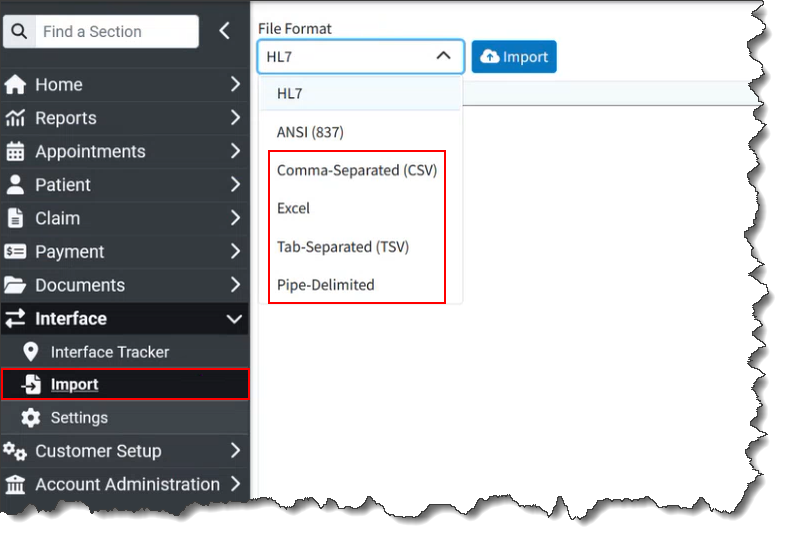
Customers can still manually import claims into our system in the HL7 format or from an 837 ANSI file into CollaborateMD.
For more information visit our Universal Import Help Articles or visit our Universal Import Interactive Demo.
Enhancements
New Rich Text Editor
This release includes an update to our Rich Text Editor, used in sections such as alerts and messaging. Although the editor functions similarly, you will notice some changes to the toolbar's appearance and its items. Icons for bold, italics, underline, and insert link remain largely the same, while others, such as Font and Font Size, have a new look. The previous Text Color and Highlight Color icons were combined into one. The Indent, Insert Ordered List, Insert Unordered List, and Insert Table icons are now visible in the toolbar. This new editor reduces clutter and increases visibility directly from the toolbar.
New Automation for Value Code 80
We previously added the ability to default value codes at the payer and patient level for institutional claims as part of our claim workflow enhancements. Value codes are specific billing details on institutional claims. For example, value code 80, "Covered Days," represents the number of days covered by the bill. This value will vary per claim, so it should not be set as a default amount.
In this release, we added an automation for value code 80. When value code 80 is used, leaving the amount blank in the default value codes section for the payer or patient will change the value field to "number of days" instead of "dollar amount." Subsequently, when a claim is received via interface, the value code's amount will be automatically set based on the number of covered days. 
Resolutions
ERA Reversal Matching Improvement
We resolved an issue that prevented some ERA reversals from applying correctly. The affected ERAs received a "we couldn't apply the reversal because there was no prior reversal to apply to" warning message. With this update, the system now looks at the previous payment to determine how the payment and adjustment should be posted. This ensures consistent application, allowing reversals to be matched appropriately.
Corrected GPI Onboarding Issues
We fixed several issues with the GPI onboarding when setting up In-App Payment Processing. The "Percentage of Processing Methods" field will now have improved validation to prevent progression with invalid or null information. Additionally, the "Title" field for the Authorized Signer will now be a dropdown menu with allowed options, preventing errors, as GPI expects specific values.
Intake Forms: Unmatched Forms Option Fixed
We corrected an issue with our Intake Forms' "Unmatched" forms feature. A previous release accidentally created a bug that prevented the option to fix unmatched intake forms from appearing when clicking on an "Unmatched" form. This has been corrected in this release and is working again.
Incorrect Net Amount Issue
We resolved an issue where a net amount could be calculated incorrectly for patients. This issue prevented the charge-level allowed and net amounts from calculating correctly in the daily/monthly net charges report. Although this issue will be fixed going forward, existing patients may still have invalid values. If that is the case, opening and saving the patient will solve the issue.
Multiple Universal Import Beta Fixes
Since releasing the Beta version of our Universal Import feature, we have updated and corrected some issues. First, we updated the Universal Import user interface to simplify the process and improve readability. We also updated how Universal Import files are read to better determine header and value rows. This means users do not need to remove blank or additional rows before the file header.
As part of this release, we are continuing our ongoing work to assess, monitor, and address any security vulnerabilities.