Highlights
New features
Statement Emails and Links Now Show a Summary (No Login Required to Pay)
Previously, patients had to enter their name and date of birth (or log in) just to view any statement information or make a payment, creating unnecessary friction. This update removes that barrier for payment specifically, while still protecting access to full statement details. It also gives the email and payment experience a more polished, consistent look, helping patients feel confident they've landed in the right place when they click through to pay.
With this release, statement emails, links, and QR codes have been updated to take patients directly to a statement summary view complete with a redesigned, professional breakdown card that matches the look of the Payment Portal itself. From this summary, patients can see their total amount due and make a payment immediately, without needing to log in or enter any personal information first. 
Enhancements
New Option: "Show Facility/Office Address" Added to Automated Statement Templates
Some states require that the location where a service was performed be included on a patient's statement. This option was already available for Enhanced and Electronic statements, and this update brings the same capability to Automated Statements, helping ensure compliance with these state-specific requirements.
With this release, the "Show Facility/Office Address" option (previously available on Enhanced and Electronic statements) is now also available in the Paper Statement Options when editing Automated Statement templates. When this option is enabled for an Automated Statement template:
- The template will display a sample Facility/Office address (based on the practice's main office address) on a single line above the charge, so you can preview how it will appear.
- When the statement is generated, this information is included as an Info Line directly before the applicable charge(s), using the same method already used for Enhanced and Electronic statements.


For more information, please visit our Configure Automated Paper Statement Template Help Article.
Improvement: Claim Statement Data Now Links to Claim, Charge, and Credit Data in Reports
Previously, Claim Statement Activity fields existed in reporting but couldn't be connected to other relevant data, such as Claim or Charge information, limiting their usefulness. Since Claim Statement data is tied to a specific Claim ID, this update allows it to be properly linked with related Claim, Charge, and Credit data for more complete reporting. With this release, Claim Statement Activity report fields can now be linked with Claim Data, Charge Data, and Credit Data when building reports (including within the standard "Statements Sent in a Date Range" report). 
Visit our Claim Statement Data report fields Help Article for the available fields.
New Additional Eligibility Automation Frequency Choices
Previously, the maximum interval available for automated eligibility checks was 30 days. However, insurance plan changes typically happen far less frequently (often just once a year). For patients seen often, this meant eligibility checks were being run more frequently than necessary, leading some customers to avoid using the feature altogether.
With this release, the Eligibility Automation setting (within Services > Real-Time Eligibility) now supports three additional frequency options for how often eligibility checks run for a patient These new options give you more flexibility to match eligibility check frequency to your actual needs:
- Every 90 Days
- Once per Year
- Once per Patient


Please note that the "Once per Year" option is based on the calendar year. This means a patient with an appointment or claim on December 31st and another on January 1st will trigger an eligibility check for both dates, since they fall in different calendar years.
For more information, please visit our Manage Real-Time Eligibility Help Article.
New Payer Billing Option: Print Attending Taxonomy Code in Box 81CC b
While many payers require the Billing Taxonomy Code in Box 81CC a of the UB-04 paper claim, some payers have requested the Attending Provider's Taxonomy Code in Box 81CC b as well. With this release, a new institutional general billing option has been added for payers. When enabled, the new "Print Attending Taxonomy Code in Box 81CC b" option sends the Attending Provider's Taxonomy Code in Box 81CC b (with the B3 qualifier) on printed institutional claims for that payer.
How It Works
- If "Print Attending Taxonomy Code in Box 81CC b" is enabled for a payer, the Attending Provider's Taxonomy Code will be sent in Box 81CC b using the standard mechanism (the claim's Billing Provider is used as the Attending Provider, and the Practice is used as the Billing Provider).
- If this option is left unchecked, any existing payer edits affecting Box 81CC b will continue to apply as before.
- If this option is checked, it will override any existing payer edits for Box 81CC b.
As part of this update, the existing Box 81CC a option has also been renamed to "Print Billing Taxonomy Code in Box 81CC a" for clarity (no functional change to that existing option). 
Visit our Payer General Billing Options Tab Help Article for more information.
First Pass Claim Count Gadget Now Refreshing Daily
Our "First Pass Resolution Rate" dashboard gadget had not been refreshing on a daily basis due to performance issues. With the recent move of Data Snapshots and reporting queries to a Read Replica database, additional capacity became available in our nightly database processing, allowing gadget refresh times to be moved earlier.
With this release, the First Pass Resolution Rate (Claim Count) gadget will now update daily, giving you more current data each time you view it.
Payer Claim Control Number Now Captured from Claim Status Reports
Our clearinghouse partner, ePS, recently updated their system to include the payer's Claim Control Number within the 277CA file (in the REF*1K segment), when the payer provides this information. Capturing this automatically helps ensure claims have accurate payer reference information without requiring manual entry. With this release, we now capture the payer's internal Claim Control Number (ICN) when available, directly from the 277CA Claim Acknowledgement file received from the clearinghouse, and set it on the corresponding claim.
"Self" Added as a Guarantor Relationship Option
Some integration partners, support a "Self" Guarantor relationship option. Previously, CMD did not have an equivalent option, so this value was incorrectly mapped to "Other" when received from an interface and that incorrect "Other" value could then be sent back out to the partner system, overwriting their original "Self" designation. With this release, we now support "Self" as a Guarantor Relationship option on the Patient record. 
Resolutions
Resolved Issue: Unable to Pay Full Balance When Below Minimum Payment Amount
The Payment Portal's configured minimum payment amount is intended to apply only to partial payments. If a patient's total balance is less than the configured minimum, they should still be able to pay off their full balance. However, patients with a balance lower than the minimum payment amount were being incorrectly prompted to pay the minimum amount instead of their actual (lower) balance, preventing them from paying off their account in full.
With this release Patients whose balance is less than your configured minimum payment amount will now be able to pay their full balance through the Payment Portal, rather than being incorrectly required to pay the minimum amount. 
Resolved Issue: Duplicate Claims Could Be Created When Saving
Corrected an issue where, in rare cases, saving a new claim could result in two identical, duplicate claims being created, particularly in situations involving an unstable internet connection. This issue has been fixed. Saving a claim will no longer result in duplicate claims being created as the system will ignore the repeated request.
Improvement: Tax ID Change Request Now Prevents Submitter ID Conflicts
Previously, it was possible to submit a Tax ID Change for one provider while another provider still shared the same Submitter ID under the old Tax ID. This could result in a single Submitter ID being tied to two different Tax IDs, causing issues with existing agreements and enrollments when the Tax ID was updated with our clearinghouse partner. With this release, CMD now checks whether another provider shares the same Submitter ID and the current (old) Tax ID. If another one exists, it will prevent the request from processing. If this happens, the customer must either update all providers associated with that submitter ID to reflect the new tax ID or create a new provider entry with the updated tax ID. This helps prevent a Submitter ID from ending up associated with two different Tax IDs, which could disrupt existing payer agreements and enrollments.
Highlights
New features
New Resource: WebAPI Documentation Site
Previously, WebAPI documentation was distributed manually as a ZIP file of Word documents, which meant developers had to remember to check for and request updated versions, and there was no guarantee everyone was working from the most current documentation.
In this release, we've launched a new, dedicated WebAPI Documentation site, replacing the previous method of distributing API documentation. Our new documentation site solves previous documentation issues by automatically updating with every new WebAPI release, ensuring you always have access to the latest information. It includes items such as API references detailing available API calls and how to use them, common workflow guides, and answers to frequently asked questions.
Our documentation site is also fully accessible to AI coding tools (such as Claude or ChatGPT). If you or your development team use AI-assisted coding, these tools can now reference our documentation directly to help build accurate integrations with CMD's WebAPI. 
Enhancements
Universal Import: Ability to Match Patients by Name Alone
Some EHR systems export limited patient information, sometimes just a patient's name, without a Date of Birth or identifier. Previously, this could prevent Universal Import from successfully matching a patient. In this release, Universal Import now supports importing claims, matching patients by name alone, for situations where an import file doesn't include a Date of Birth or a patient identifier. This update adds name-only matching as an additional option to help these imports succeed.
How It Works
Universal Import will always attempt matching in this order:
- Patient identifier (if available)
- Date of Birth
- Name only (new) — used only as a last resort, when no identifier or Date of Birth is available.
Patient-only updates will still require the date of birth. If a name-only match finds more than one patient with the same name, Universal Import will not create or update a patient or match the claim, since it cannot reliably determine which patient is correct. In this scenario, the import file will need to include a Date of Birth for each patient to allow proper matching.
Remittance Codes Can Now Be Added Without a TCN
Previously, the system required a TCN in order to add remittance codes, since Claim Tracker relies on TCNs to show claim submissions for denial management. However, this created a challenge for customers importing older, historical claims. For example, using Universal Import to bring in past claims and then posting payments via an 835/ERA upload. Without a TCN, denial reason codes from these older ERAs couldn't be posted, making it difficult to fully work historical AR.
With this release, CMD now supports adding remittance and denial codes on an EOB even when there is no TCN (activity ID) associated with the claim. If you're importing older claims and posting payments via an 835 file, you can now fully post remittance and denial codes even when the claim has no TCN.
While this scenario is still not the ideal way to bring claims into CMD, this update ensures denial details are captured and available in denial reporting, rather than being lost.
New Report Field: Charge-Level Primary Payer "Allowed Amount"
The Primary Payer Allowed Amount field was previously added at the Claim level dataset. In this release, we added this report field to the Charge level, found under Charge/Debit Data → Charges → Primary Payer → Allowed Amount. This update provides more flexibility by allowing you to report on the Primary Payer Allowed Amount at either the Claim level or the Charge level, whichever best fits your reporting needs. 
Provider Adjustments Now Matched by Payer Claim Number
Previously, Provider Adjustments were matched to a claim only by TCN number. However, some payers send their own internal claim number instead of CMD's TCN, which could prevent a Provider Adjustment from being correctly matched to the corresponding claim. With this release, Provider Adjustments can now be matched to a claim using the Payer Claim Number, in addition to the existing TCN (activity ID) matching.
This means that Provider Adjustments should now match more reliably to the correct claim, even when a payer references their own internal claim number instead of the TCN, making it easier to track and report on these adjustments.
New Payer Enrollment Enhancement Ensures Correct Tax Id is Sent
Previously, if a provider's Tax ID was updated in CMD after a payer enrollment (agreement) had already been created, that enrollment could sometimes still go out to EPS with the old Tax ID, rather than the corrected one (potentially causing delays in getting claims set up correctly with the payer).
This release ensures that payer enrollment requests always include the current Tax ID on file, guaranteeing that submissions contain accurate information. So if you need to correct a provider's Tax ID after initially entering it incorrectly, new payer enrollments will now go out with the updated Tax ID, helping avoid delays in claim setup with that payer.
Search Added to Update Status Dropdown in Claim Control
Some practices have a large number of claim statuses configured (sometimes 50, 100, or more) making it difficult to scroll through and locate the correct one. In this release, the Update Status dropdown on the Claim Control results screen now includes a search field, making it easier to find and select a claim status. With the new search field, you can simply type into the search field to quickly filter and find the status you're looking for, rather than scrolling through the full list. 
Request Customer Name Change in Customer Management
Previously, customers requesting a name change would need to call Support, and the change would be made manually with no formal tracking or auditing. This update automates the process while ensuring every name change request is fully tracked within CMD. A new "Request Customer Name Change" option is now available within Account Administration → Customer Management. Authorized representatives can now submit a customer name change request directly within Account Administration. The change is processed automatically, and a complete history of the request is tracked in the system. 
Resolutions
Resolved Issue: Practice Fusion Co-Pay Not Applying Without Pre-Configured Amount
Previously, if a patient's co-pay amount was not already configured in CMD, a co-pay received from Practice Fusion along with a claim would not be applied.
This issue has been fixed. Co-pays received from Practice Fusion will now be applied to the claim automatically, even if a co-pay amount was not pre-configured on the patient.
More Reliable ERA Patient Matching When TCN Is Not Present
When an ERA payment doesn't include a TCN, CMD attempts to match the payment to a patient already in the system. We've made improvements to this matching process to make it more reliable. This is especially helpful when importing historical claims into CMD — for example, when a customer imports older claims via Universal Import and then posts payments from an 835/ERA upload where no TCN is available. More reliable patient matching in these scenarios helps ensure ERA payments are correctly applied.
Resolved Issue: Accident Information Not Copying to Institutional Claims via WebAPI
When claims were created via the WebAPI, Accident-related information, including the Auto Accident indicator and Accident State was correctly copying to Professional claims, but not to Institutional claims. This issue has been fixed. Accident information sent via the WebAPI now correctly copies to Institutional claims, consistent with how it already worked for Professional claims.
Please note that for accident and illness information to copy over via the WebAPI or Universal Import, the Practice-level claim setting "Include Accident and Illness Information on Claims for All Patients" must be enabled. If this setting is not enabled, accident and illness information will not be set on claims created via the API or Universal Import, regardless of this fix. 
Highlights
New features
Eligibility for Newly Added Payers Will Now Be Set to Active by Default
Previously, when a new payer was added to a customer's Payer list, that payer would be defaulted to Inactive for eligibility on the provider configurations screen, even when the provider was set up to have eligibility active for all payers. This required an additional manual step to activate eligibility for each newly added payer.
Going forward, any newly added payer will now default to Active for eligibility, rather than requiring a manual update. This change only applies to payers added after this release; it does not change the eligibility status of payers already in your system. If you have existing payers currently set to Inactive that you'd like to activate, you can still do so using the Batch Update option within Configure Eligibility. 
For more info on manually configuring eligibility, please visit our Configure Eligibility for Provider Help Article.
New Support for Sending Both Rental and Purchase Price on DME Claims
Previously, DME claims only supported reporting a single price. If you needed to report both a purchase price and a rental price for the same equipment, there was no way to do so. With this release, CMD now supports including both the purchase price and the rental price on Durable Medical Equipment (DME) claims. Four new columns have been added to DME claims:
- Rental Unit Price
- Length of Medical Necessity
- Frequency
- Total Rental Price
How It Works
- If you're only reporting the rental price for a piece of DME, you don't need to fill out these new fields, simply enter the rental amount using the standard Unit Price, Units, and Total Charges fields, just as you would for any other charge.
- The new rental fields are only needed when you want to report both the purchase price and the rental price on the same claim.
- The Total Rental Price is automatically calculated as Rental Unit Price × Length of Medical Necessity. For example, a Rental Unit Price of $50 (billed monthly) with a Length of Medical Necessity of 4 months results in a Total Rental Price of $200 (separate from the purchase price, which might be $500).
- This information is sent electronically via the SV5 segment on electronic DME claims. It is not included on paper claims (rental pricing information is only relevant and transmitted for electronic DME claim submission).
With this release, if a payer requires both purchase and rental pricing details for DME, you can now report both values on a single claim, ensuring your electronic submission includes the correct SV5 segment information. 
For more information on using this DME options on claims, please visit our DME Form Link Help Article.
Enhancements
Smarter ERA Automations
This release includes two enhancements to the ERA auto-post feature, configured within the Payers section. Previously, if auto-post was enabled, the process would stop whenever there was a difference between the patient name on the payer's end and the name entered in CMD. We found this was resulting in a significant number of false positives, unnecessarily preventing ERAs from auto-posting. This update allows auto-posting to proceed even when a name mismatch is detected rather than being held for manual review.
We also fixed the "Allow payments with provider adjustments to auto post" setting, found within the ERA auto-post configuration that was not functioning correctly. This setting is intended to give you control over whether payments containing provider adjustments are eligible for auto-posting. This issue has been corrected, and the setting will now properly take effect. 
Fee Schedule Import Now Populates Missing Code Descriptions
Previously, Fee Schedule imports would only apply a description when creating a brand-new code, even if your import file included a description column with useful information for existing codes that were missing one. With this release, when importing prices into a Fee Schedule, CMD will now use the description from your import file to populate a code's description, but only if that code's description is currently blank in the Procedure Code section. This allows those existing, blank descriptions to be filled in automatically from your import file.
What This Means for You
- If a code in your Procedure Code section currently has no description, and your Fee Schedule import file includes a description for that code, it will now be filled in automatically.
- If a code already has a description, it will be left unchanged — the import will never overwrite an existing description.


For more information, visit our Add a Fee Schedule from imported prices Help Article.
Patient Estimates Now Show In-Network/Out-of-Network Status
Previously, users could not easily tell which estimate applied to an in-network provider versus an out-of-network provider when multiple estimates were available for the same patient. In this release, when generating an Auto Estimate for a patient, each available estimate in the dropdown will now display whether it is "In Network" or "Out of Network" directly in parentheses next to the estimate. This is especially helpful in cases where a payer sends both an in-network and out-of-network estimate for the same visit, making it difficult to know which one to select. 
New Optional Office Location Column in Claim Control
In this release, you can now add the Office Location as a column to your Claim Control view to see each claim's assigned office at a glance. This is especially helpful for verifying claim accuracy and reviewing claims by office location directly within the table. This column will be hidden by default but available by using the right-click select columns feature on this screen. 
Guarantor Email Now Supported via Inbound HL7 WebAPI
This release also added support for receiving the Guarantor Email through inbound HL7 WebAPI endpoints. Guarantor Email was already supported via XML through the WebAPI, but not through HL7. This update brings HL7 in line with XML, allowing WebAPI vendors using HL7 to also send Guarantor Email information.
Resolutions
Resolved Issue: Patient Record Not Updating When Patient Texts "STOP"
Patients can opt out of all text messages including appointment reminders and statements. They can do that at any time by texting the word "STOP." However, when a patient did this, their patient record in CMD would still display as opted in, even though the system was correctly honoring the opt-out and no further messages were being sent. This made it difficult for staff to know, at a glance, that a patient had opted out.
 Please note that once a patient sends "STOP," CMD cannot send that patient any further text messages (including opt-in messages). The patient must send "RESUME" to the same text message thread, or text "RESUME" to 74121, in order to begin receiving messages again.
Resolved issue: Unable to Add a New Group to a User
Following our previous release, some users were unable to add a new group to a user account (for example, when granting a user access to an additional customer). This issue affected a number of customers and was identified and corrected via a hotfix, allowing you to add new groups to user accounts (including granting access to additional customers) without issue.
Resolved Issue: Payment Plan Credit Not Converted to Regular Credit When Plan Is Paid Off or Deleted
Corrected an issue where, when a Payment Plan was paid off or deleted, any associated Payment Plan Credit was not being properly converted into a regular Account Credit. As a result, the credit continued to display as a "Payment Plan Credit" in Manage Account, even though the plan itself had been paid off or deleted.
This release corrects this issue so when a Payment Plan is paid off or deleted, any associated credit is now automatically converted into a regular Account Credit, allowing it to be applied normally like any other credit on the account.
Resolved Issue: Family Statements Not Showing Balances for All Linked Patients
We've resolved an issue where Family Statements were not displaying charges for all linked patients. Instead of showing the balance for the entire family, the statements only reflected charges for the individually selected patient. This issue has been fixed, and Family Statements now correctly display the balance for all linked patients, providing a complete and accurate view of charges and balances across the entire family.
As part of this release, we are continuing our ongoing work to assess, monitor, and address any security vulnerabilities.
Highlights
New features
Expanded E-Statement and Payment Portal Access
Some practices and billing services aren't able to use CMD's In-App Payment Processing (for example, if your patients or customers already pay through your own payment processor or EHR). Previously, this meant you couldn't offer the Payment Portal experience at all. Now, you can still give your patients the full Payment Portal experience while directing actual payment to your own processor.
In this release, a new "Payment Portal without In-App Payment Processing," option can now be enabled for your account. Once this option is enabled, you can add a payment link (such as a text-to-pay link) from your own payment processor. Patients will still get the complete Payment Portal experience including visit history, payment history, and current balance but when they select Pay Now, they'll be directed to your configured payment link to complete payment.
This option is disabled by default. If you're unable to use In-App Payment Processing but would like to offer e-statements and the Payment Portal to your patients, contact your account manager or Support to have "Payment Portal without In-App Payment Processing" enabled for your account.
Please note that because there is no direct integration between the payment link and our system, payments made by patients will not reflect in their accounts immediately; they could take 24 to 48 hours to post to your CMD account.
For more info, please visit our Payment Portal- Practice FAQs Help Article.
Data Snapshots and Reporting Moved To a Read Replica Database
We've updated various Report pieces, as well as Data Snapshots, Dashboards, and Timeline queries to run against a Read Replica database instead of the primary database. A Read Replica is a continuously updated copy of our database dedicated to handling read-only requests, separate from the primary database that handles all data entry and updates. By moving reporting and snapshot queries to the Read Replica, we reduce the load on the primary database, which is designed to prioritize the day-to-day actions you take in CMD. This change is designed to improve system performance and stability, particularly for reporting: Dashboards and Timeline data should load more consistently throughout the day, and Data Snapshots should be delivered earlier than before. This is part of an ongoing rollout, and we'll continue moving additional reporting and snapshot features to the Read Replica over the coming weeks to months as we monitor performance and results. No action is required on your part, as these improvements are applied automatically and will continue to roll out over time.
Enhancements
ERA Patient Matching No Longer Flags Middle Initial Mismatches
When reviewing an ERA, CMD previously still displayed a warning if a patient's middle initial did not match the file, even when the first and last names matched. This generated unnecessary warnings that did not indicate an actual patient matching issue. This update ensures that discrepancies in middle initials no longer trigger alerts. Warnings are now reserved for mismatches in first or last names, allowing you to focus on patient records that require genuine attention. 
New Tax ID Permission Level For Bill Pay Permission
Previously, if you wanted to allow someone such as a provider to add their own new Tax ID in the Provider section, you had to set their Bill Payment permission to Allow. The problem was that the "Allow" permission level also gave that person the ability to pay your entire monthly invoice and receive the monthly invoice email. In this release, we added a new permission level for Bill Payment called Tax ID Add-On. This allows a user to pay invoices related to adding a new Tax ID for a provider, without being able to view or pay any other invoices. This is especially relevant for billing services that want to let providers self-manage their own Tax ID setup.
The updated Bill Payment permission levels are now:
- Deny – User cannot make any bill payments.
- Tax ID Add-On (new) – User can pay invoices related to adding a new Tax ID in the Provider section only. They cannot view or pay any other invoices, and will not receive monthly invoice emails.
- Allow All – User has full access to view and pay any invoice, and will receive monthly invoice emails (same as the previous "Allow" permission).
Please note that if you previously had a user set to Allow, that user has automatically been updated to Allow All, so their access remains unchanged. Users previously set to Deny will remain unchanged.

Payer Alerts Now Show Immediately When Adding a Policy
Previously, when adding a new policy to a patient using a payer that has an Alert configured to display in the Patient section, the Alert would not appear immediately. This applied whether the policy was added to an existing patient or a brand-new patient, causing the Alert to only display after saving, closing, and reopening the patient record. This could be an issue in cases with alerts containing time-sensitive or critical information that needs to be reviewed immediately (for example, special billing instructions or requirements tied to that payer).
his release updates the Payer Alert to display immediately upon adding a policy with a configured alert, whether for a new or existing patient. It is no longer necessary to save and reopen the patient record.
Login Performance Improvement
We've improved login performance in CMD, especially for users associated with a large number of groups (users with access to hundreds of customers). If you're a user with access to a large number of groups or customers, you should notice faster, more efficient login times after this release.
Resolutions
Universal Import Improvements & Fixes
This release includes several improvements and resolved issues for Universal Import.
Bill Type Now Correctly Defaults on Institutional Claims
Issue: When importing a file containing Institutional claim data (such as revenue codes or admission date) that did not include a Bill Type column, the Bill Type was being incorrectly set to "1" instead of using the practice's default Bill Type — resulting in incomplete claims.
Resolution: This issue has been fixed. Universal Import now correctly applies the practice's default Bill Type to Institutional claims when the import file does not include a Bill Type column.
New: Admitting Diagnosis Code Support
Universal Import now supports mapping and importing Admitting Diagnosis codes, in addition to standard diagnosis codes.
Value Code Amounts with Dollar Signs or Commas Now Processed Correctly
Issue: Universal Import was not correctly processing Value Code Amount fields containing dollar signs or comma-formatted numbers (e.g., $5,321.34 was being incorrectly split into two separate values).
Resolution: This issue has been fixed. Value Code Amounts are now correctly interpreted, even when formatted with dollar signs or comma separators.
Organization Providers Now Mapped Correctly
Issue: Universal Import was not correctly identifying providers set up as organizations (rather than individuals) in CMD. As a result, organization provider names were not being mapped correctly, causing claims to fail with a "rendering provider can't be found" error instead of importing successfully.
Resolution: This issue has been fixed. Universal Import now correctly determines whether a provider is an individual or an organization and maps the provider name accordingly.
Date of Birth Validation Added
Issue: Universal Import was not validating the Date of Birth field for proper date format. As a result, an invalid or incomplete date value (e.g., "01/05/.1") could be imported and converted to an incorrect date, such as "0001," instead of triggering a validation error.
Resolution: This issue has been fixed. Universal Import now validates the Date of Birth field to ensure it matches an expected date format before import, flagging invalid values rather than converting them to an incorrect date.
Errors Switching Between Linked Patient Portal Accounts
We corrected an issue where patients with multiple Patient Portal accounts linked together (via matching email and password credentials) — including accounts belonging to different CMD customers, could experience errors when attempting to switch between those linked accounts or take certain actions in the Payment Portal. This occurred because the system could not properly locate the linked patient account within the currently logged-in customer.
This issue has been fixed and the Payment Portal now correctly handles patient account lookups, allowing patients with multiple linked accounts to switch between them without errors.
Resolved issue: Claims Incorrectly Submitted Electronically to Secondary Payers
Corrected an issue where claims were being submitted electronically through both Real-Time Claim Submission (RTCS) and regular claim submission to a secondary payer even when the Master Payer List indicated that the payer did not support electronic secondary claim submission. This could result in claims being immediately rejected or left unresolved, causing a delay before the claim could be corrected and resubmitted through the appropriate method.
Resolved Issue: Last Character of ICD Code Removed When Tabbing Out of Field
We've resolved an issue when setting up Patient Default ICD codes where, under certain circumstances, the last character of the ICD code would be removed when tabbing to the next field. This issue has been fixed. ICD codes entered in Patient Default settings will now retain all characters when tabbing to the next field.
Resolved Issue: Missing Validation for Some Value Codes During Import
We've resolved an issue where after importing claims, invalid or excessively long Value Codes could be passed through without validation, potentially resulting in a database constraint violation rather than a clear, actionable message.
This issue has been fixed. Value Codes are now validated during import, and a clear, actionable message will be displayed if a Value Code does not meet expected format or length requirements instead of an unexpected database error.
As part of this release, we are continuing our ongoing work to assess, monitor, and address any security vulnerabilities.
Highlights
New features
Electronic Statement - Summary Card & Balance Breakdown Improvements
As part of our Electronic Statements Enhancements Project, we've redesigned the top section of the electronic statement to make it clearer and easier for patients to understand exactly what they owe and why. Previously, the electronic statement displayed a prominent "Pay Now" button and "Choose Payment Plan" button, but the actual amount owed and how that amount broke down was difficult to read and understand. This release cleans up and clarifies that experience.
The redesigned statement now leads with a clear "Amount You Owe" figure at the top, followed by a breakdown of that balance into Deductible, Co-Pay, Co-Insurance, and Other, so patients can see exactly what's contributing to their balance rather than being left to guess. 
We've also separated insurance payments and insurance adjustments into two distinct lines. Previously, these were combined into a single line, which led patients to believe their insurance had paid more than it actually did, since adjustments were being lumped in with actual payments. By splitting these out, patients can now clearly see what insurance actually paid versus what was adjusted off, reducing confusion and, hopefully, the number of patient call-ins asking to explain their balance. 
The "Other" line under Amount You Owe will typically show as $0 for most patients. This category is intended for charges that aren't directly tied to insurance payment activity, such as late fees or similar miscellaneous charges.
That said, depending on how payments were posted, it's possible for a balance to show entirely under "Other." This does not indicate a bug or issue with the statement itself; it reflects an issue with how the payment was manually posted rather than an error in this feature.
For manually posted payments, the correct remittance/unpaid reason code must be entered in the "Unpaid Reasons" column for the balance to display correctly under the appropriate category rather than falling into "Other."
By clarifying the amount owed and breaking down exactly why a patient owes what they owe, this update helps patients better understand their statements at a glance, reducing confusion and unnecessary calls to the practice asking for an explanation of their balance.
For more info, please visit our Electronic Statement Overview and Using The Payment Portal Help Articles.
Enhancements
Claim Control – New Optional Member ID Column
Claim Control now supports an optional Member ID column, giving experienced billers a fast, at-a-glance way to catch potential claim issues before submission. A missing or incorrectly formatted Member ID is often an early warning sign that a claim is likely to be rejected, and many billers are already familiar with the typical Member ID formats used by major payers such as Medicare, Aetna, and Blue Cross. With this information visible directly in Claim Control, billers can quickly spot something that looks off without needing to open individual claims to check.
The new Member ID column is optional and not displayed by default, keeping the standard Claim Control view uncluttered for users who don't need it, while making it easy for billers who rely on this information to add it to their view whenever they choose. You can access the additional fields by clicking the "+" symbol in the top-right corner of the Claim Control screen or by right-clicking the table header and selecting "Available Columns."
WebAPI – Support for Supervising Provider & Resubmitted Claim Fields (XML)
This release adds two enhancements to the WebAPI interface for customers submitting claims via XML, improving support for supervising providers and enabling resubmission of previously submitted claims.
Supervising Provider Support
The WebAPI now supports specifying a Supervising Provider on Professional Claim submissions through the XML endpoints. This allows customers integrating via XML to send supervising provider information directly as part of their claim submission, rather than requiring a workaround. This enhancement applies specifically to the XML Professional Claim endpoints and does not apply to HL7 submissions.
Support for Resubmitted Claims (Claim Frequency & Claim Control Numbers)
Previously, WebAPI had no way to submit claims that had already been submitted once before, since the fields needed to indicate claim frequency and claim control number weren't available through the interface. While this isn't something that can reasonably be added to HL7 due to limitations in the standard itself, it's fully supportable in XML, so we've added it there.
WebAPI now supports an optional Frequency field for Professional claims, which defaults to 1 if not specified and accepts valid values of 1, 7, or 8. This field is not used on Institutional claims, since those rely on the Type of Bill field instead.
Alongside frequency, WebAPI now also supports Claim Control 1, Claim Control 2, and Claim Control 3 fields. Each is optional and limited to 50 characters, and each posts into the corresponding claim control field based on the payer, such as ctrlNo1 and ctrlNo2. If a corresponding payer isn't present on the claim, for example, a secondary claim control number without a secondary payer on file, the value won't be posted into that field. In that case, the claim will still process successfully, but a warning will appear in Interface Tracker to flag that the value wasn't applied.
Universal Import – Admission Hour & Discharge Hour as Separate Columns
Previously, when importing files through Universal Import, the Admission Date & Time and Discharge Date & Time each had to be combined into a single column. However, on the claim itself, these fields are actually separate, and only the hour is captured rather than a full time value. This meant the import format didn't quite match how the data is actually structured on a claim.
With this release, the hour component for both Admission and Discharge can now be mapped as its own independent column during import, separate from the corresponding date column. This aligns Universal Import with how these fields work natively on a claim, giving customers more flexibility in how their source files are structured.
reCAPTCHA Whitelisting by Username
Previously, whitelisting a user from reCAPTCHA required both a dedicated username and a known, fixed IP address. This worked well for many automation setups, but became a limitation for RPA bots running in environments where a consistent IP address isn't available or practical to configure.
With this update, if a whitelisted username has no IP address specified (left null or blank), that user will now be allowed through the reCAPTCHA check regardless of which IP address the login request originates from. This gives customers a way to whitelist RPA bots even when their automation runs from dynamic or unpredictable IP addresses.
As with existing whitelisting practices, each RPA bot should continue to use its own dedicated user login rather than sharing credentials with a human user, ensuring login activity remains properly attributed and secure.
Resolutions
Claim File Indexer Restored
Due to an underlying indexing issue, 837 files for claims sent in July were not available for download within the application. We've since identified the root cause and corrected the problem and resolved the issue. In addition to fixing the underlying issue, we ran a re-indexing process across all affected July claim files to restore their availability. As a result, 837 files for claims sent in July are now fully accessible for download again.
Fee Schedule Import Fix
Previously, when creating a new fee schedule by uploading an Excel or CSV file through the Import Prices option, users would encounter an unexpected error instead of having the fee schedule successfully created from the imported file. This issue has been corrected. and users can now successfully create a new fee schedule by uploading a file through the Import Prices option, with the fee schedule populating correctly from the imported data.
Resolved issue: Charge History Shown in Wrong Order
When multiple charge history entries shared the same timestamp, those rows were sorted arbitrarily rather than in a consistent, predictable order. As a result, the last entry shown to users did not always reflect the charge's actual current status, potentially leading to confusion when reviewing charge history.
This sorting issue has been corrected. Entries sharing the same timestamp are now sorted in a consistent order, ensuring the last row displayed in Charge History accurately reflects the charge's true, current status.
Proof of Timely Filing Letter Fix
We've resolved an issue affecting the Proof of Timely Filing letter. This feature was occasionally failing to generate a letter for certain claims that were submitted in batch on specific days. The root cause was traced to incorrect information being sent to our clearinghouse partner, EPS, when requesting the timely filing letter. Specifically, the system was sending an incorrect responsibility code and process date, which prevented EPS from returning the completed form.
Both the responsibility code and process date being sent to EPS have been corrected, ensuring the necessary information is now submitted accurately when a Proof of Timely Filing letter is requested.
Release Notes: Practice Fusion – Repeating Appointments Fix
We've resolved an issue affecting repeating appointments created in Practice Fusion and transferred into CMD. When a repeating appointment was set up and saved in Practice Fusion, only the first occurrence was transferring correctly into CMD. Subsequent occurrences of the repeating appointment were being blocked by duplicate message protection, which was incorrectly treating them as duplicate messages rather than distinct, valid occurrences.
This issue has been corrected so that all occurrences of a repeating appointment created in Practice Fusion now transfer correctly into CMD, without being blocked by duplicate message protection.
ERA - Resolving Charge Not Found Issue by "Find Charge" Not Applying Adjustment Codes
We've resolved an issue affecting ERA processing when resolving a "Charge Not Found" error using the Find Charge option. When a user resolved a "Charge Not Found" error by using Find Charge and selecting the correct available charge, the system correctly marked the issue as resolved and added the charge to the ERA. However, the associated CO-16 adjustment code for the unpaid amount was not being applied. Because that adjustment code was missing, the associated payment automation tied to it also failed to run.
This issue has been corrected. Resolving a "Charge Not Found" error via Find Charge now correctly applies the appropriate adjustment code for the unpaid amount, allowing the associated payment automation to run as expected.
Medicare Fee Schedule 2026 – Incorrect Prices Fix
When creating or updating a fee schedule based on the Medicare Fee Schedule 2026, the system could update the wrong prices instead of the intended ones. This was traced back to an issue with our initial import of the 2026 Medicare Fee Schedule data. The underlying Medicare Fee Schedule 2026 data has been corrected, ensuring that fee schedules set up using it now update with the correct, intended prices.
Elation Health – Insurance Data Message Inconsistency Fix
We corrected an issue where the Elation Health messages were found to be inconsistent in how they included insurance information. This update ensures that insurance information is now included consistently within Elation Health messages.
As part of this release, we are continuing our ongoing work to assess, monitor, and address any security vulnerabilities.
Highlights
|
New Features
|
Enhancements
|
|---|---|
New features
Electronic Statement Configuration Improvements
Several enhancements have been made to Electronic Statement Configuration as part of our Electronic Statements Enhancements Project to provide practices with greater control and flexibility:
- Per-practice configuration: E-Statement configuration is now set per practice, rather than per customer (consistent with how paper statement configuration already works). Each practice can now have its own Electronic Statement settings, instead of one setting applying across the entire customer account.


- Default reply-to address: The "Send Email Reply to Address" field will now automatically default to the practice's default email address. This can still be changed to a different address, or turned off entirely if you don't want to accept email replies. This can be done from the "Send email replies from receipts & statements to" new field in the practice section or directly within the electronic statement template options.


- Patient Comment in Payment Portal: When the option "Use Patient Comment (if exists) in place of the Important Message" is selected, the Payment Portal's Important Message will now be populated using the patient's Patient Comment, when one exists.


If you need help setting up Electronic Statement Templates, please visit our Configure Manual Electronic Statements Help Article.
Contracts: Support for Single Case Agreements
Out-of-network providers are sometimes granted permission to treat an individual patient under special circumstances — such as continuing an existing course of care, or when no in-network provider is available in the area. This arrangement is formalized through a Single Case Agreement, which is a contract that applies to just one patient, rather than to a payer relationship broadly.
To support this, a new "Apply as a Single Case Agreement" option has been added to Payer Associations within Contracts. When enabled, users can select a single patient to which the contract will apply. Once configured, the system will apply Single Case Agreement contracts in:
- EOBs: When automatically entering the allowed amount
- ERAs: When determining whether a contract warning should be shown
- Reports: In the Current/Primary/Secondary/Tertiary Contract Amount and Contract Name fields
This allows practices to accurately reflect and apply special one-patient contract arrangements throughout the billing workflow, rather than needing to work around the limitation manually. 
For more information on setting up a Single Case Agreement, please visit our Managing Payer Associations Help Article.
Enhanced Eligibility Custom Reporting
You can now build custom reports on detailed insurance eligibility and benefit information — going far beyond simply confirming whether a patient has active coverage.
What's new: Previously, eligibility checks returned rich benefit details (coverage levels, copays, deductibles, and more), but this information wasn't accessible for reporting and viewing any specific detail required opening each patient individually and reviewing their eligibility report one at a time.
With this release, that data is now automatically captured and organized so you can report on it directly, across patients. A new "Eligibility Benefit Data" report category is now available, with two main configurable fields:
- Benefit Type: Allows you to filter by the type of eligibility benefit (e.g., Deductible, copay, out-of-pocket max), covering roughly 35 standard benefit types returned by payers.
- Benefit Item Value: Allows you to drill into a specific service type within that benefit (e.g., Health Benefit Plan Coverage), with roughly 150 possible values to choose from.
These new fields connect directly to your existing Eligibility Data reports, so you can build on reporting you already use today. 
Why it matters:
Every payer can return similar information in slightly different ways, and the range of possible benefit details is extensive. Rather than requesting a custom report each time you need a new data point, you can now filter and report on the specific benefit information that matters to your practice.
Please note that this applies to new eligibility checks only. Eligibility results processed before this release are not included (there is no retroactive backfill of historical data).
For more information on adding these report fields, visit our Eligibility Benefit Data Fields Help Article.
Enhancements
Expanded Availability of Electronic Claim Status
Previously, Electronic Claim Status could only be checked when a claim's status was "At Insurance." Once a customer updated a claim to a different status while working it (including custom statuses), they lost the ability to check status electronically (even if the claim was still legitimately pending with the payer).
In this release, we have updated this so that Electronic Claim Status is now available for claims in most statuses, with restrictions applying only to statuses marked as "Not billed" (collections, denied, rejected, or balance due patient). Customers using custom statuses to track claims through Insurance AR can now continue checking Claim Status electronically as they work a claim, instead of losing that ability as soon as the status changes.
Visit our Check Claim Status Help Article for more information.
New Payment Automations by Procedure Code
We added a new Procedure Code option to the Payment Automation criteria (above Payment Amount), allowing a single procedure code to be selected so the automation only runs when it matches the charge's procedure code. 
Visit our Add Payment Automations Help Article for more information.
Eligibility Now Shows More Details Within the Plan Number
When an eligibility response is received, the "Plan Number" field, located under the "Subscriber/Plan Information" tab, previously displayed only the plan number. This number is the unique identifier assigned by the payer to a specific insurance plan, helping the customer distinguish which of the many available plans a patient has. It is used to identify the precise benefits, coverage, and cost-sharing amounts associated with the patient's policy.
Accurately identifying a patient's plan is important for any practice, but it is critical for California IPA plans. In California, Independent Physician Associations (IPAs) are often tied to specific medical groups and PCP networks. The plan number acts as a code to identify the exact health plan and managed care plan network, which directly dictates patient benefits, PCP assignment, and required authorization procedures for services. When we receive an eligibility response message, it sometimes includes an additional segment with the name of the Group, Plan, or Network associated with the plan number.
In this release, when the eligibility response message includes an additional segment with the group, plan, or network name, we will now include the plan name when it is provided with the plan number in the response. This will assist practices that handle California IPAs by offering an additional reference point to minimize errors. 
Patient Activity: "Show Net Amount" Option Relocated for Easier Access
The option to display the Net Amount (expected revenue) in the Patient Activity listing has been moved to a more accessible location. Previously, this option was located in Patient Settings, where it was difficult to find. It has now been moved to the Activity View Options popup, appearing as a checkbox directly under "Show Entered Dates." When checked, the "Show Expected Revenue and Net Balance" option will display an Expected Revenue column in the Claim Activity window, as well as replace the Balance column for a Net Balance Column.
Interface Tracker: New Optional "Fix User" & "Fix Date" Columns
Previously, marking a message as fixed within Interface Tracker provided no record of the user or the date, making follow-ups difficult. This release introduces two optional columns that are hidden-by-default to address this:
- Fix User: Displays the user who marked the message as fixed.
- Fix Date: Displays the date the message was marked as fixed.


This provides users better visibility into who resolved an interface tracker message and when.
Universal Import Updates
Universal Import: Marital Status (and Similar Fields) Now Accept Text Values
Previously, Universal Import only accepted marital status as a numeric or single-letter code. Text values such as "MARRIED" were flagged as invalid, even though they represented a legitimate, recognizable value. This caused import failures for customers whose source files used text rather than codes.
In this release, Universal Import now accepts text values (case-insensitive) for marital status, in addition to the existing numeric/letter codes. This same improvement applies to similar fields that previously had the same limitation.
Previously, Universal Import could not import the Patient Account Type field, resulting in incomplete patient records for customers who use this capability. In this release, we added support for mapping and importing Patient Account Type as part of the patient import process. Customers using custom account types can now bring in complete patient records through Universal Import, without needing to manually update Account Type after import.
Resolutions
Dashboard: Corrected "Days in AR" Calculation
A previous change caused the "Days in AR" dashboard to be calculated by counting only the days on which charges were entered, rather than all calendar days a charge remained outstanding. For practices that enter charges just a few times per week but bill on a regular schedule, this caused charges to appear to "age" only on entry days, significantly understating how long they had actually been outstanding.
In this release, we corrected this so that the "Days in AR" dashboard now correctly counts all calendar days a charge remains outstanding between billing cycles, regardless of how frequently charges are entered.
Payment (ERA): Unpaid Codes Not Applied When Processing Secondary Payer
Corrected an issue when processing a secondary payer's ERA, where the claim was incorrectly marked as Paid, and the PR-2 (patient responsibility) adjustment code from the remittance was not being captured. The PR-2 is now correctly being captured and applied when processing secondary payer remittances, ensuring the claim reflects the accurate payment and patient responsibility status.
Resolved Issue: "Find a Time" Option Not Returning All Available Appointments
We corrected an issue where the "Find a time" feature in the appointment scheduler did not consider appointment blocks correctly and returned very few results, failing to show all available appointment time slots.
Resolved Issues: Fee Schedules CPT Cache Not Updating After Procedure Code Changes
When a procedure code was updated within a fee schedule, the change was saved correctly to the database and properly logged in the audit trail. However, the record's "last modified" timestamp was not being updated as part of that change. Because the system uses this timestamp to detect updates, the cache did not recognize the procedure code as changed, meaning the update may not have appeared for other users or in places that pull from the cached data until a later.
The "last modified" timestamp is now correctly updated whenever a procedure code is changed within a fee schedule, ensuring the cache reliably picks up the change.
Claim Control: Fixed Diagnosis Duplication When Combining Institutional Claims
When combining institutional claims in Claim Control, the principal diagnosis was being incorrectly duplicated as an "other diagnosis" on the combined claim (even in cases where both claims shared the same principal diagnosis). This issue has been resolved, along with related issues identified when combining institutional claims. Diagnosis codes are now combined correctly, without duplicating the principal diagnosis as an other diagnosis.
Resolved Issue: Eligibility Date of Birth Correction Not Suggested When Mismatched
When an eligibility response returned a different Date of Birth than what was on file in CollaborateMD, the system did not prompt the user to correct it, even though similar correction suggestions were already working for other fields, such as name and member ID.
The system now correctly evaluates Date of Birth as part of its correction-suggestion logic, alongside existing checks for name and member ID. When a mismatch is detected, users will now be prompted to review and correct the DOB in CollaborateMD, consistent with how other field mismatches are handled.
Resolved Address Validation Issue
When a patient's address required correction (via the Address Correction service) and Insured was set to Self on the Insurance Info tab, both the Patient Info and Insurance Info tabs were flagged with an address issue. Correcting the address on the Patient Info tab resolved the flag there, but the Insurance Info tab remained flagged even though the insured's address was identical to the now-corrected patient address.
We resolved this so when the patient is set as their own insured (Insured = Self), correcting the address issue on the Patient Info tab now also clears the corresponding flag on the Insurance Info tab, since the two addresses are the same.
As part of this release, we are continuing our ongoing work to assess, monitor, and address any security vulnerabilities.
Highlights
| New Features | Enhancements |
|---|---|
| Simplified Logo & Practice Info Setup for Payment Portal
|
Field Renamed: "Net Amount" Now "Expected Revenue"
|
New features
Simplified Logo & Practice Info Setup for Payment Portal
What's New
You can now upload your company logo directly within the Practice section, instead of setting it up separately in the Payment Portal and Statement configuration screens. Once set at the practice level, your logo will automatically appear on both your patient statements and your payment portal (no need to upload it in multiple places).
If you have multiple practices, you can upload a different logo for each one. Statements will automatically use the logo tied to each patient's default practice.
Why We Made This Change
Previously, logos had to be configured separately for the Payment Portal (Services → Payment Portal → Header Template) and for statements. This extra setup made it easy to overlook, especially for practices managing multiple locations. A clear, full-color logo on statements has been shown to improve the likelihood that patients follow through on payment, so we wanted to make it as simple as possible to set up. 
What Else Is Changing
- Practice Info Is Now Pulled Automatically: Previously, you had to manually enter your practice name, address, and other details in the Payment Portal configuration screen. That step has been removed — this information is now pulled directly from your Practice settings.
- Custom Contact Info Per Practice (New Option): If you want different contact details (phone number, website, address, etc.) shown in the payment portal than what's listed in your Practice settings (i.e. multiple practices), you can now enable this using the new "Use separate contact info for payment portal" checkbox within the Statement Template setup. This gives you full control over exactly what displays in the payment portal, independent of your practice-level settings.


What This Means for Existing Customers
If you've already configured a logo, practice name, address, or other details in your Payment Portal or Statement sections, nothing will change. Your existing configuration, logo, and information will continue to display exactly as it does today — no action needed.
What You Need to Do
- If you're already set up: No action is required.
- If you haven't set up a logo yet: We recommend visiting the Practice section to upload one, so it automatically appears on your statements and payment portal.
- If you manage multiple practices with different contact details: Consider using the new "Use separate contact info for payment portal" checkbox to customize what patients see per practice.
Questions?
If you need help setting up your logo or configuring practice-specific contact information, please visit our Add a New Practice Help Article.
Enhancements
Field Renamed: "Net Amount" is Now "Expected Revenue"
What's Changing
To make our reporting clearer, we've renamed "Net Amount" to "Expected Revenue" throughout the platform. This change is cosmetic only — no calculations, data, or functionality have changed. We're simply giving this field a name that better reflects what it represents.
Why We Made This Change
"Net Amount" wasn't clearly communicating what the value actually means. This field represents the charge amount minus expected (or actual) contractual adjustments — in other words, the revenue you can expect to receive from a service. "Expected Revenue" better conveys this at a glance.
Where You'll See This Update
| Location | Previous Label | New Label |
|---|---|---|
| Reports → Net Amount report field | Net Amount | Expected Revenue |
| Reports → Daily/Monthly Net Charges | Daily/Monthly Net Charges | Daily/Monthly Expected Revenue |
| Patient → Settings | "Show the Net Amount and balance (based on the allowed or contracted amount) in Patient Activity?" | "Show the Expected Revenue and Net Balance (balance net expected or actual contractual adjustments) in Patient Activity?" |
| Activity Report | Net Amount column | Expected Revenue column |
New: Tooltip Added to Net Balance
On the Activity Report, we've added an info icon next to Net Balance with a brief explanation: "The current balance minus expected contractual adjustments"
This is intended to help clarify how Net Balance is calculated, since it relies on the same underlying logic as Expected Revenue.
Good to Know
- This is a labeling change only — underlying values, formulas, and report data are unchanged.
- Expected Revenue currently reflects primary payer adjustments only; secondary and tertiary payer adjustments are not yet factored in.
- If a claim is denied, Expected Revenue will display as $0.00, even if an appeal is in progress or still possible.
Recommended Action
No action is required. If you have saved reports, dashboards, or documentation that reference "Net Amount," you may want to update them to reflect the new "Expected Revenue" terminology.
Visit our Daily/Monthly Expected Revenue Report Help Article for more information.
New Claim Edit: Admission Date Now Included for Place of Service 33
Certain payers require the admission date for accurate claim processing when billing for Place of Service 33. In this release, CMD has added a new claim edit for payers GREATER ORANGE COUNTY MEDICAL GROUP (NMM01) & EMANATE HEALTH IPA (MPM62) that automatically includes the admission date on professional claims when the Place of Service code is 33 (Custodial Care Facility). This update ensures that information is included automatically, helping reduce denials and rejections for these payers, related to missing admission date data.
Improvement: Support for Multiple Practice Fusion Interfaces
Some organizations manage more than one Practice Fusion account (for example, across different locations or provider groups) but want that data consolidated under a single CMD customer. With this release, we now supports connecting multiple Practice Fusion accounts to a single CMD customer. Previously, each CMD customer could only be linked to one Practice Fusion interface.
Updated Insurance Processing For The ElationHealth API
Elation Health is updating how insurance information is processed through their platform. To stay compatible with this change, CMD is updating how it sends and receives insurance data for customers using the Elation Health integration.
Resolutions
Resolved Issues: Universal Import Fixes
This release includes three minor fixes for Universal Import.
1. Two-Digit Years in Date Fields Interpreted Incorrectly
A recent release introduced an issue where two-digit years in date fields imported from Excel files were not always being interpreted correctly. For example, a two-digit year such as "33" could be converted to "2033" instead of "1933," potentially resulting in inaccurate birthdate values. This issue has been fixed and two-digit years in imported date fields are now interpreted correctly.
2. Incorrect "Not Enough Information" Error
Universal Import was incorrectly displaying a "not enough information to create complete patients" error, even when the import file contained all the necessary information to create complete patients and claims. This issue has been corrected and Universal Import will no longer display this error when the file contains complete and sufficient information.
3. Statement Covers From Date Incorrectly Flagged as Duplicate
The Statement Covers From date field was being incorrectly flagged as a duplicate during the import preview, even though the field was not actually duplicated and was being mapped correctly upon completing the import. This issue has also been resolved. The Statement Covers From date field is no longer flagged as a duplicate during the import preview.
Resolved Issue: Batch Eligibility Running for Deselected Payers
When running Batch Eligibility, patients with certain payers were having eligibility checks run even when that payer was excluded from the batch. With this release, Batch Eligibility now correctly honors the selected filters, so patients with deselected payers are excluded from the eligibility run as expected.
Resolved Issue: Incorrect Last Billed Date in Claim Follow Up Management
In Claim Follow Up Management, the Last Billed Date was not always reflecting the most recent billing date for a claim. When using the Last Billed Ins Date filter, the system could return a billed date that fell within the filtered range, even when a more recent billing date existed outside that range. We corrected this so the Last Billed Date in Follow Up Management now correctly reflects the most recent billing date for a claim, regardless of the date range used in the Last Billed Ins Date filter.
Resolved Issue: Timeline "Claims at Status" Incorrectly Counting Account Debits
When configuring the Timeline to display "Claims at Status," the count could incorrectly include account debits, resulting in an inaccurate claim count at the selected status. This issue has now been fixed so the Timeline's "Claims at Status" calculation now excludes account debits, reflecting only actual claims at the selected status.
Resolved Issue: WebAPI Charge Reference Error
Some customers experienced an error when submitting claim messages containing an excessively long Charge Reference Number (FT1-9.0 field). In these cases, the claim would fail to be created in CMD, and the system would return an exception instead of processing the message.
The application has been updated to automatically truncate the FT1-9.0 value when it exceeds the allowed length, rather than rejecting the message. This allows the claim to now be created successfully without manual intervention.
Resolved Issue: Batch Eligibility Results Error
We resolved an issue where running Batch Eligibility for a date range could result in an unexpected error, preventing eligibility results from being displayed. This fix ensures the results page now displays correctly.
As part of this release, we are continuing our ongoing work to assess, monitor, and address any security vulnerabilities.
Highlights
| New Features | Enhancements |
|---|---|
| Last Payment Amount Fields Now Available in Reports
|
New Agreement Required Warning When Adding a Payer
"Delete Credit" Renamed to "Unapply Credit" in Manage Account |
New features
Last Payment Amount Fields Now Available in Reports
Previously, charge-level reporting included fields for the date of the last payment received and the total amount of payments posted, but lacked the ability to report on the amount of the last payment itself.
In this release, we added six new charge-level report fields within the Report Builder > Charge/Debit Data > Charges > Payments, that complement the existing Date of Last Payment and Total Payments Posted fields, giving you a more detailed view of payment activity at the charge level:
- Last Received Payment Amount — Total of all payments received at the time of the last received payment.
- Last Entered Payment Amount — Total of all payments entered at the time of the last entered payment.
- Last Entered Patient Payment Amount — Total of all patient payments entered at the time of the last entered patient payment.
- Last Received Patient Payment Amount — Total of all patient payments received at the time of the last received patient payment.
- Last Entered Insurance Payment Amount — Total of all insurance payments entered at the time of the last entered insurance payment.
- Last Received Insurance Payment Amount — Total of all insurance payments received at the time of the last received insurance payment.

For more info on these report field descriptions, visit our Payments Report Field Description Guide Help Article.
Enhancements
New Agreement Required Warning When Adding a Payer
Some payers require a signed agreement before professional or institutional claims can be submitted electronically. If claims are sent to the clearinghouse before this agreement is approved, they will be dropped to paper and mailed, resulting in additional charges.
To help prevent this, we have added a new warning that will appear when saving a payer that requires a claim submission agreement. The warning will notify you that:
- Claims cannot be sent electronically until the agreement has been completed and approved.
- Any claims submitted before the agreement is in place will be dropped to paper and mailed, incurring additional charges.


Visit our Add New Electronic Payer Help Article for more information.
Improvement: "Delete Credit" Renamed to "Unapply Credit" in Manage Account
Previously, the Delete Credit option was used in all credit deletion scenarios within Manage Account, which could be misleading. When removing an applied account credit, the money is not actually deleted — it is returned to the Account Credit bucket to be applied elsewhere at a later time.
To better reflect what is actually happening, we have renamed this option to Unapply Credit when an applied account credit is selected. This distinction makes it clearer that selecting this option will not remove the funds from the account, but simply un-apply them so they can be applied to a different charge when needed. 
More Universal Import Enhancements
We've made two additional updates to Universal Import in this release:
- Multiple Charges on a Single Line — The import process now correctly handles multiple charges entered on a single line, ensuring that all associated dates, modifiers, units, and charge details are carried over accurately during the import.
- Improved Column Matching and Preview — The import review screen now correctly displays all importable fields, even if a field is blank for the current row. This ensures all fields being imported are visible during review, preventing fields from appearing unmatched and providing a more accurate picture of your import before finalizing.
Resolutions
Fixed: CO-45 Adjustment Code and Amount Display Issue
We resolved an issue where adding a CO-45 code to the Adjustment Reasons on a payment row caused the code and amount to move to the unpaid reasons column, while the amount remained visible in the Adjusted column as well — resulting in the amount appearing in both columns simultaneously.
This release includes two specific fixes related to this behavior:
- Adjustment Amount Handling — When an adjustment amount is saved without a code and a code is subsequently added that triggers an automatic move to the unpaid column, the adjustment amount will now move consistently with the code. It will no longer appear in both the Adjusted and Unpaid columns at the same time.
- Payment Automation Scope — Payment automations tied to a specific adjustment code (such as code 96) will now only affect that specific code. Unless a code is configured to process as a total denial, it will remain in the correct column and will not inadvertently trigger column changes for other codes on the same row.
Fixed: Source Claims Now Correctly Deleted When Combining Claims
We resolved an issue where combining claims in Claim Control would successfully create the new combined claim, but the original source claims were not being deleted as expected. With this release, combining claims will now correctly create the new claim and delete the original source claims in a single action.
Improved: Denials Report Performance
We resolved a performance issue that was causing the Denials Report to run slowly, even when running it for a short date range like a single week. So, With this release, the Denials Report will now run significantly faster, even for larger date ranges.
As part of this release, we are continuing our ongoing work to assess, monitor, and address any security vulnerabilities.
Highlights
New features
Bulk Claim Status Updates Now Available in Follow Up Management
Previously, when managing claims from the "Follow-up Management" screen, bulk actions were limited to adding notes and setting follow-up dates. The next logical step would be to allow users to update claim statuses in bulk when adding notes or adjusting follow-up dates after contacting a payer.
In this release, we added a new "Update Status” button to the follow up management table that allows you to change the claim status for all selected claims in a single action — making it easier to keep your workflow moving after contacting a payer. 
Note: You can also update a claim's status and add a note directly from the Check Claim Status button. However, these options will only appear when the real-time status check returns results — if no results are found, the update and note options will not be available, as they are tied to the outcome of the status check.
For more info on how to update claim statuses from the Follow Up Management screen, visit our Update Claim Status From F/U Management Help Article.
Ability To Search Multiple Statuses At Once From Claim Control
Previously, searching for claims in Claim Control was limited to one status at a time, meaning you had to run separate searches to find claims across different statuses.
With this release, you can now select multiple claim statuses at once when searching in Claim Control. For example, you can search for all claims that are "Pending" and "In Progress" simultaneously, rather than running individual searches for each status. This makes it faster and easier to identify and bulk update a broader group of claims in a single search. 
Note: When searching with multiple statuses selected, the date range for the claim's date of service or entry date is limited to a maximum of one year
For more information on selecting multiple claim statuses in Claim Control, visit our Update Claim Status Help Article.
New Automatic Multi-Payer ERA Splitting
Some payers now use third-party companies to handle their ERA processing. These third-party processors often manage ERAs for multiple payers, which can result in a single ERA file containing checks from more than one payer. Previously, CMD could only handle one payer per ERA file, which could cause issues when a single ERA contained checks from multiple payers.
With this release, ERA files containing multiple payers will automatically be split into separate ERA files upon receipt. This means that when you go to apply payments, the system will automatically associate the correct payer with each check — no manual corrections needed.
Note: This will affect all new files received from the clearinghouse and all files uploaded after the release.
Enhancements
Statement Batch Printing By Last Seen Date
When a patient is admitted to a facility, offices typically submit multiple interim claims to the payer while the patient is still receiving care. During this time, sending the patient a billing statement is often premature and can create a poor experience.
To address this, we previously added a Last Seen Date filter to Statement Automation, allowing you to hold statements until a patient has been discharged. With this release, we've brought that same capability to the Statement Batch Print screen.
You can now filter by Days Since Last Seen when batch printing statements, ensuring that statements are not sent to patients who are still admitted to a hospital or facility. 
Visit our Batch Print Statements For Outstanding Charges Help Article for more information.
Improved Eligibility Labeling
We've improved the way eligibility responses display certain payer and provider information. Previously, details such as the IPA payer, HMO payer, contracted service provider, and service facility were returned in the eligibility response without clear labels, making it difficult to identify and use that information effectively.
With this release, these fields are now properly labeled in the eligibility response, so you can quickly identify the relevant information and use it with confidence.
New Interface Setting To Use CMDs Situational & Default Modifiers
Previously, we introduced the ability for API customers to use CMD's internal default and situational modifiers, which offer more robust modifier management than what most EHR systems provide natively.
With this release, this setting is now available for Practice Fusion and Elation Health interfaces. Users of these integrations can enable and configure this option directly from the Interface Settings screen. 
Note: Even if the setting is configured to use modifiers from the interface, default and situational CMD modifiers will still apply if none are received.
Taxonomy Specialty Can Now Be Overridden Independently in Payer Records
When configuring a Payer record, you have always had the option to override the Tax ID, NPI, address, and taxonomy specialty using the Use Alternate Practice Information checkbox. However, if you only needed to override the taxonomy specialty, the system previously required you to also override the NPI, Tax ID, and name — even if no changes to those fields were needed.
With this release, you can now override the taxonomy specialty on its own and save the record without being required to populate any other override fields. 
Resolutions
Updated: ERA Search Now Limited to a One-Year Date Range
To ensure system stability and optimal performance, ERA searches are now limited to a maximum date range of one year when searching by report date. Searches without a specified date range are no longer supported.
Previously, selecting "All" dates while searching by check number required the system to scan every ERA file ever received, which could place significant load on the database and impact overall system performance. This change is necessary to maintain a reliable experience for all users.
What this means for you:
- If you were previously using "All" as your date range, switching to "Last 12 Months" should allow you to locate most ERAs you are looking for.
- If you are searching for an older ERA, we recommend narrowing your date range to a short window — such as one week — around the expected check date to quickly locate the file.
Fixed: Residual Balances on Completed Payment Plans Now Handled Correctly
When a patient is on a payment plan and a payer processes a claim resulting in a higher patient responsibility than originally anticipated, a remaining balance can sometimes be left on the charges associated with the payment plan — even after the payment plan itself has been paid in full.
Previously, once a payment plan was completed, any charges with a remaining balance would no longer appear on patient statements and could not have payments applied to them, since they were still tied to the closed payment plan. As a workaround, many customers were manually deleting the completed payment plan to free up those charges.
With this release, this issue has been resolved. Once a payment plan is paid in full, any associated charges with a remaining balance will automatically become available again — appearing on statements and accepting payments as expected. No manual intervention or deletion of the payment plan is required.
Universal Import Resolutions
We've made two updates to the Universal Import feature in this release:
- Claim Reference # Import — You can now map and import the Claims Reference Number field, expanding the data available for import.
- Preview Screen Fix — The preview screen now correctly displays all fields from your import file, even if the sample patient record does not have a value for a particular field. Previously, fields without a value for the sample patient were not shown, which made it difficult to verify your field mappings before completing the import.
As part of this release, we are continuing our ongoing work to assess, monitor, and address any security vulnerabilities.
Highlights
New features
Alternate Eligibility Payer ID
Some HMO payers (specifically Independent Physician Associations, or IPAs, in California) have a specific network payer ID that provides claim services, while the regular payer ID is used for Eligibility. Users have previously requested that we update our system to add a separate connection for Eligibility when the main clearinghouse connection doesn’t support Eligibility. In this release, a new checkbox has been added to the patient insurance policy section, allowing users to verify eligibility through an alternative payer. When selected, an additional field appears, enabling users to search for and designate a separate payer. This option is available only when the primary payer does not support eligibility verification. 
For more info on how to set up a different payer ID for eligibility, visit our Add Insured or Payer Policy Help Article.
Universal Import Updates
This release introduces more enhancements to the Universal Import feature to improve data matching accuracy, and reduce manual preparation across various import scenarios. These updates include:
- Anesthesia Support: Previously, customers were required to manually enter start and stop times for each anesthesia claim during the import process. This will now happen automatically while processing Universal Import files. The system now identifies start and stop times, calculates the duration of anesthesia, and automatically applies the appropriate units and pricing based on those minutes.
- Fix Import Data Option: When importing a file, users may receive a warning indicating insufficient information to create patients or claims. The system provides details specifying the requirements needed in the file to resolve these errors. This required the file to be updated and re-uploaded, even if the only change involved a field shared by all patients or claims, such as provider, date of service, or diagnosis. This release introduces a "Fix" button, allowing you to enter missing information directly during the import process. You no longer need to modify and re-import files; you can now update data for all patients or claims directly within the system at the time of import. Please note that this method is only suitable when the missing information is the same across all records, such as a shared diagnosis, procedure code, or date of service. If the missing information varies, you must update the import file accordingly before uploading. This approach applies only when the data is identical for all items imported from the claim.

For more information on using the Fix option, visit our Importing CSV, Excel, TSV, or Pipe-Delimited Files Help Article.
Enhancements
Claim Status Service Information Now Displayed
Previously, electronic claim status responses displayed claim-level payment information but omitted certain charge-level details provided by the payer. Consequently, data such as service line payment amounts were not captured, requiring users to contact the payer directly for this information. In this release, the system will automatically pull in the paid amount for each service line, provided the payer supplies this information. Access to this data will save customers time by eliminating the need to contact the payer for status updates.
New Alerts Column in Claim Control
A new "Alerts" optional column has been added to the Claim Control table, allowing users to view alerts while reviewing claims prior to submission. This column is hidden by default and mirrors the functionality in Follow-Up Management, displaying a clickable yellow bell icon when alerts are present. Clicking the icon displays the claim alert pop-up. 
New Alerts Side Panel in Follow Up Management
This release introduces alert visibility when viewing individual claims within Follow Up Management. Previously, alerts were only accessible via the main table’s yellow bell icon. Users can now view or add alerts directly within the side panel, enabling immediate issue identification during claim processing. 
Visit our View/Add Alerts From Follow Up Help Article for more information.
Charge Panel Limit Increased
Previously, our charge panels were limited to five-character codes, restricting the system to 999 panels. In this release, we have increased the code limit to 10 characters to support a larger volume of panels, allowing customers to create an unlimited number of charge panels per account. 
New Report Field: # of Public Follow Up Notes
Previously, it was possible to retrieve the number of claim notes but not follow-up notes. This release introduces a new report field, "# Number of Public Follow-Up Notes," allowing users to see the number of public claim follow up notes in reports. This release also renames the existing "# Number of Notes" field to "# Number of Claim Notes." 
Resolutions
Denials and Unpaid Reasons Reports Slowness When Using Remittance Received date
Resolved an issue causing slowness in "Denials and Unpaid Reasons" reports when using the Remittance Received date filter. This fix significantly improves the performance of the remittance received report filter for customers.
As part of this release, we are continuing our ongoing work to assess, monitor, and address any security vulnerabilities.
Highlights
| New Features | Enhancements |
|---|---|
| Even More Universal Import Updates | New Referring Provider Column in Claim Control |
New features
Even More Universal Import Updates!
This release introduces further enhancements to the Universal Import feature, continuing to streamline the mapping of imported columns to CollaborateMD fields. Key updates include:
- Recognizing institutional claims: Previously, customers were required to include a claim type column in their imports to specify institutional claims. This necessitated manual intervention, as EHR exports typically lack this information. This release introduces support for importing institutional claims by automatically identifying them through specific data fields. Fields such as Revenue Code, Value Code, Admit Type, and Condition Code are now used to recognize institutional claims, eliminating the need for adding a manual claim type column.
- Better Provider Name matching: We have improved our provider name matching. Provider names often appear in a single column, sometimes accompanied by IDs or credentials. In this release, the system has been updated to ignore these extraneous details to accurately identify the first and last names for searching. While the system now effectively parses these columns, we still recommend maintaining a separate provider NPI column whenever possible.
- Support for Different Modifiers for each charge: The system has been updated to support distinct modifiers for individual charges. Previously, the system incorrectly consolidated all modifiers into a single list and applied it to every charge. This release ensures that imported files correctly match specific modifiers to their respective charges. Additionally, the system now treats "NA" or "N/A" values as blanks when multiple modifier codes are present.
- Support for State's Full Name: We have updated our address matching to support both full state names and two-digit abbreviations. The system now correctly processes EMR files regardless of whether the state is provided as a full name (e.g., Florida) or an abbreviation (e.g., FL).
- Better Recognition of columns with duplicate or invalid values: We have updated the system to improve handling of multiple potential matches, such as when both rendering and provider NPIs are submitted. The system now clearly distinguishes between matched and unmatched entries. Previously, if one field matched, the other was omitted, which often caused confusion regarding the data imported.
- Improvement when combining multiple rows into one claim: Previously, the system consolidated rows for the same patient based solely on claim or appointment IDs. This often incorrectly merged records involving different providers or payers. Because distinct providers indicate separate services, these records must remain on individual claims. This update improves logic to prevent the improper combination of claims.
- Excel formatting now used for number columns: When exporting member IDs starting with zeros to Excel, the application often removes the leading zeros, resulting in incorrect IDs and claim denials. In this release, we updated the Excel formatting for numeric columns to preserve leading zeros.
- Support for Importing Patient's Marital Code: Resolved an issue where patient marital status failed to import during data retrieval for meaningful use or other tracking purposes. This release ensures the information is now correctly imported.

Continue checking our release notes for further Universal Import updates and enhancements coming soon.
Enhancements
New Referring Provider Column in Claim Control
When reviewing claims, users often need to verify referring provider information, particularly for services or payers where the referring provider is always required. Previously, when working claims from the Claim Control screen, users had to open each individual claim to ensure this information was present and accurate. To improve this workflow, we have added the referring provider as an optional column (hidden by default) in Claim Control. This column allows users to identify and quickly access claims missing a referring provider for correction.
GPI Onboarding Now Automatically Checks Status of In-Progress Applications
Previously, the status of in-progress GPI applications (and their credentials) was only checked when users manually accessed the In-App Payment Processing section. As this process was often overlooked, we have updated the system to automatically check for pending applications upon login. This ensures that credentials and merchant details are retrieved promptly, allowing users to begin processing payments without delay.
Resolutions
Ability to Run Patient Eligibility When a Patient Record is Locked
Previously, if a user opened a patient record already locked by another user, they could view the information but were unable to check eligibility. As saving the record is not required to perform this action, this update allows users to run eligibility checks even when a patient record is locked (in use) by another user.
Practice Fusion Issues Fixed
We also implemented reliability improvements to resolve a duplication issue where Practice Fusion sent redundant claim copies.
Scrolling Issues in Safari
We have resolved scrolling issues in Safari where headers would disappear when viewing large tables. The headers now remain correctly positioned. Mac users who previously switched browsers due to this issue may now return to Safari, as functionality has been restored.
Intelligent Claim Rejection: "Marked as Fixed" Issue
We resolved an issue where marking claim rejections as "fixed" did not consistently update their status. Previously, claims remained visible in search results for unresolved issues due to underlying errors that were not properly cleared. This update ensures that all claim issues are fully marked as resolved upon confirmation.
As part of this release, we are continuing our ongoing work to assess, monitor, and address any security vulnerabilities.
Highlights
| New Features | Enhancements |
|---|---|
| More Universal Import Updates | New GPI Onboarding Tooltips Revenue Code-Specific Taxonomy Codes |
New features
More Universal Import Updates
This release introduces further enhancements and updates to the Universal Import feature, streamlining the process of mapping imported columns to CollaborateMD fields. The system now supports importing addresses consolidated into a single column by automatically recognizing individual address components (street, city, zip, etc.). Additionally, we have added support for importing multiple insurance policies from a single column to accommodate various export formats. Please note that we still recommend keeping address fields such as street, city, state, and zip code in individual columns whenever possible.
This release includes updates to ignore "N/A" fields in columns, eliminating the need for manual removal prior to upload. We have also improved payer name matching, allowing files to be uploaded without editing names containing extra parentheses or special characters. Additionally, refinements to the AI prompt will minimize unexpected errors during file imports. 
Continue checking our release notes for further Universal Import updates and enhancements coming soon.
Enhancements
New GPI Onboarding Tooltips
Several sections of the GPI In-App Payments application have caused customer issues; for example, entering incorrect placeholders for average transaction amounts has led to application delays or denials. In this release, new tooltips have been added to the merchant details screen during GPI onboarding to clarify these fields. Hovering over these fields now displays a tooltip explaining the required information. Tooltips have been added to fields such as types of goods, services, annual volume, average sale price, and sales channels, to assist customers in completing the required information.
Revenue Code-Specific Taxonomy Codes
Vermont Medicaid requires specific taxonomy codes for certain behavioral health institutional claims, depending on the revenue code used. To comply with these billing guidelines, a new "Taxonomy Code Override" field has been added to the Revenue Code section within the Claim Defaults tab. This allows users to assign specific taxonomy codes to individual revenue codes.
Please note that this feature requires a feature flag. If you require access to per-revenue code taxonomy overrides, please request it via a support case.
Resolutions
Claim Control Incorrect Warning
Some users previously encountered warnings in Claim Control when a claim contained charges with multiple statuses. Because the system's ability to update these statuses depended on the things like the processing order, the behavior was inconsistent and confusing.
In this release, we resolved this issue so that Claim Control now correctly processes charges regardless of their individual statuses within a claim.
Incorrect Warning for "Forgot Password" option
New Institutional Claim Edit: TOB 86x
We have added a new institutional claim edit for bill type 86. These inpatient claims generally do not involve a hospital admission; therefore, by default, we do not transmit admitting diagnoses or related admission fields. If customers using bill type 86X experience rejections or denials due to missing admission information, they may request this edit via support. We can then enable their payer to ensure the admitting diagnosis is included when the bill type begins with 86.
Custom Edits (Aptarro) Issue
We resolved an issue regarding custom edits at Aptarro where certain submitter IDs were missing from our system despite being previously established. All affected submitters have been corrected, and we have implemented measures to prevent submitters from being inadvertently removed in the future.
As part of this release, we are continuing our ongoing work to assess, monitor, and address any security vulnerabilities.
Highlights
| New Features | Enhancements |
|---|---|
| New Total and Selected Patient Counts in Claim Control | Payment Automations UI Update Universal Import UI Update |
New features
New Total and Selected Patient Counts in Claim Control
We previously added the total and selected charges & claims to the bottom of the Claim Control results screen. In this release, we added "Total Patients" and "Selected Patients" counts to the Claim Control results screen. These fields display the total number of unique patients and, when claims are selected, the number of unique patients within that selection.

Enhancements
Payment Automations UI Update
The "Edit" button previously located at the top of the payment automation screen was misleading. Rather than allowing users to modify specific automations, this button is used to reorder, activate, or deactivate them. To edit an individual automation, users must open the specific entry directly. To avoid confusion, in this release the "Edit" button within Payment Automations has been renamed "Reorder," as it is used to reorder, activate, or deactivate automations rather than edit them. 
Improved Deposit Date Reporting
We have improved the performance of reports, such as the Daily Deposit Report, when filtering by deposit date. Previously, generating these reports for large accounts over extended periods was time-consuming. By adding an index to the Deposit Date field, we have matched the efficiency of reports filtered by received date, significantly increasing processing speed and preventing timeouts.
ERA Negative Adjustments
Previously, negative adjustments were not applied correctly to ERAs, resulting in inaccurate credits. This issue pertains to scenarios where a payer’s payment and adjustment total exceeds the billed amount, adding a negative adjustment (not refunds/reversals). In this release, the system has been updated to correctly apply these negative adjustments for primary payers when claims are received with amounts intended to offset overpayments.
Universal Import UI Update
We made a minor update to the universal import process. Previously, after reviewing the field matching in the review screen and then selecting " import" the dialog remained open, requiring users to manually close it to see the option to review the results. With this update, the dialog now closes automatically, removing an extra step and streamlining the workflow. 
Resolutions
Electronic Statements Issue
We resolved an issue where setting up electronic statements when the patient was already receiving paper statements, would occasionally received both formats simultaneously, exceeding the established statement limit before an FDN. In this release, we updated the system so that enabling electronic statements for patients already receiving paper statements will not trigger electronic delivery for them. Electronic statements will now only be issued to patients who have not previously received paper statements. Once a patient pays and resets their balance, the process restarts: we will send electronic statements, followed by paper statements and the FDN.
Incomplete Claims Won't Appear in Follow-Up Management
Interface Error With the Archive Insurance Option
We previously identified isolated interface errors that prevented claims from posting and patient records from updating. As a workaround, users were advised to temporarily disable the "archive patient insurance information" setting. This release resolves the issue, allowing users to re-enable this feature.
Universal Import Updates
Invoice Email Update
Resolved an issue where users incorrectly received invoice emails after being reassigned from a custom permission to a "User Role" without the permission. The system had failed to clear the legacy permission, causing it to persist despite the role change not including it.
As part of this release, we are continuing our ongoing work to assess, monitor, and address any security vulnerabilities.
Highlights
| New Features | Enhancements |
|---|---|
| Universal Import | New Rich Text Editor New Automation for Value Code 80 |
New features
Universal Import
This release introduces the beta version of CollaborateMD's Universal Import feature. Many Electronic Health Record (EHR) systems now include interfaces designed to export data, often in HL7 standard format, offering greater flexibility to their users. However, a common issue is that numerous EHRs lack interfaces for external systems. This deficiency creates substantial additional work for medical practices and billing services, as they are forced to manually input claims and patient data into CMD.
Our Universal Interface Import allows users with an EMR/EHR that has not built an interface with us to import encounter, claim, and patient data from any external system. Customers can now upload CSV, Excel, TSV, and pipe-delimited files using our Interface Import section. This new feature uses AI-powered field mapping to automatically interpret the structure of CSV/Excel files from other systems and map them into CMD. This feature allows customers who do not use our WebAPI to automatically import claims, and patients from any EMR/EHR via a report or export from their software. 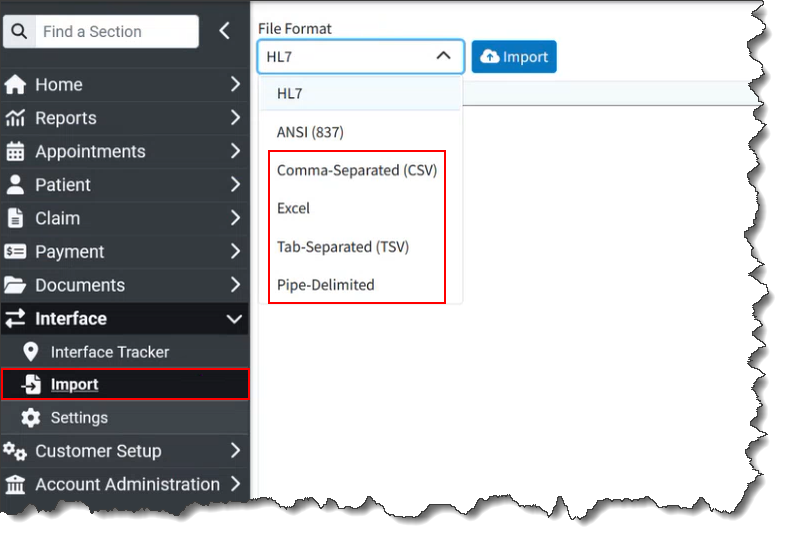
Customers can still manually import claims into our system in the HL7 format or from an 837 ANSI file into CollaborateMD.
For more information visit our Universal Import Help Articles or visit our Universal Import Interactive Demo.
Enhancements
New Rich Text Editor
This release includes an update to our Rich Text Editor, used in sections such as alerts and messaging. Although the editor functions similarly, you will notice some changes to the toolbar's appearance and its items. Icons for bold, italics, underline, and insert link remain largely the same, while others, such as Font and Font Size, have a new look. The previous Text Color and Highlight Color icons were combined into one. The Indent, Insert Ordered List, Insert Unordered List, and Insert Table icons are now visible in the toolbar. This new editor reduces clutter and increases visibility directly from the toolbar.
New Automation for Value Code 80
We previously added the ability to default value codes at the payer and patient level for institutional claims as part of our claim workflow enhancements. Value codes are specific billing details on institutional claims. For example, value code 80, "Covered Days," represents the number of days covered by the bill. This value will vary per claim, so it should not be set as a default amount.
In this release, we added an automation for value code 80. When value code 80 is used, leaving the amount blank in the default value codes section for the payer or patient will change the value field to "number of days" instead of "dollar amount." Subsequently, when a claim is received via interface, the value code's amount will be automatically set based on the number of covered days. 
Resolutions
ERA Reversal Matching Improvement
We resolved an issue that prevented some ERA reversals from applying correctly. The affected ERAs received a "we couldn't apply the reversal because there was no prior reversal to apply to" warning message. With this update, the system now looks at the previous payment to determine how the payment and adjustment should be posted. This ensures consistent application, allowing reversals to be matched appropriately.
Corrected GPI Onboarding Issues
We fixed several issues with the GPI onboarding when setting up In-App Payment Processing. The "Percentage of Processing Methods" field will now have improved validation to prevent progression with invalid or null information. Additionally, the "Title" field for the Authorized Signer will now be a dropdown menu with allowed options, preventing errors, as GPI expects specific values.
Intake Forms: Unmatched Forms Option Fixed
We corrected an issue with our Intake Forms' "Unmatched" forms feature. A previous release accidentally created a bug that prevented the option to fix unmatched intake forms from appearing when clicking on an "Unmatched" form. This has been corrected in this release and is working again.
Incorrect Net Amount Issue
We resolved an issue where a net amount could be calculated incorrectly for patients. This issue prevented the charge-level allowed and net amounts from calculating correctly in the daily/monthly net charges report. Although this issue will be fixed going forward, existing patients may still have invalid values. If that is the case, opening and saving the patient will solve the issue.
Multiple Universal Import Beta Fixes
Since releasing the Beta version of our Universal Import feature, we have updated and corrected some issues. First, we updated the Universal Import user interface to simplify the process and improve readability. We also updated how Universal Import files are read to better determine header and value rows. This means users do not need to remove blank or additional rows before the file header.
As part of this release, we are continuing our ongoing work to assess, monitor, and address any security vulnerabilities.
Highlights
| New Features | Enhancements |
|---|---|
| New Plan Name Details Within the Eligibility Plan Number | ERA Name Mismatch Warning Will Now Ignore the Middle Name |
New features
Eligibility Will Now Show Extra Details Within the Plan Number
This item has been delayed due to a bug but will be released soon.
Accurately identifying a patient's plan is important for any practice, but it is critical for California IPA plans. In California, Independent Physician Associations (IPAs) are often tied to specific medical groups and PCP networks. The plan number acts as a code to identify the exact health plan and managed care plan network, which directly dictates patient benefits, PCP assignment, and required authorization procedures for services. When we receive an eligibility response message, it sometimes includes an additional segment with the name of the Group, Plan, or Network associated with the plan number.
In this release, when the eligibility response message includes an additional segment with the group, plan, or network name, we will now include the plan name when it is provided with the plan number in the response. This will assist practices that handle California IPAs by offering an additional reference point to minimize errors. 
Enhancements
ERA: Name Mismatch Warning Will Now Ignore The Middle Name
When reviewing an ERA, if a patient had a mismatched middle initial, the system would always display the "Name Mismatch" warning. This scenario could occur if the ERA and CMD records have a discrepancy in the middle initial, such as one record including it while the other does not, or if the initials themselves differ.
The purpose of this warning is to identify instances where the payer may have a completely different patient. A missing middle initial is not critical and was generating numerous warnings for correct patients due to unmatched or missing initials.
In this release, we updated this process to no longer show this warning based on the middle initial. Instead, it will only check if the first and last name do not match, regardless of whether the middle initial is present. This will reduce the time spent reviewing unnecessary warnings.
Resolutions
Missing Tooltip in Dashboards
A bug affecting the A/R Dashboards has been fixed. The bug, introduced in the last release, prevented the hover-over feature from displaying the amount represented by a bar or graph point. This functionality has been restored. 
Copy Configuration Issues Within Claim Scrubbing
When an authorized representative adds additional services, particularly for billing service customers, they can copy existing service configurations of certain services from one customer to another. This feature is crucial for billing services that frequently onboard new customers, as it significantly reduces data entry and setup times.
The problem was that the copy configuration feature was not working correctly for the "Claim Scrubbing" feature. When Copy Configuration was used for claim scrubbing, the selected specialty was not set up correctly, and the Aptarro submitters were not set up for the enabled customers.
In this release, we corrected this issue so that when the "Copy Configuration" option is used, the system copies and displays the selected specialty and registers the required submitters with Aptarro.
Copy Configuration Issues Within Interface Automation Settings
We also corrected an issue where, the copy configuration option was not working for interface automation settings. This meant that when copying the configuration to other customers, applicable interface automation settings, within features such as address verification and eligibility, were not being copied over.
In this release, we resolved this so that if there are any interface automation options selected, they are also copied over as part of the process. 
Claim Tracker: Mark as Fixed Issue
We also corrected an issue stemming from our 16.3 release, where Claim Tracker inconsistently marked some rejections as fixed. When checking the claim-level checkbox next to a claim without expanding it in Claim Tracker, the row would remain checked, but the "Mark as Fixed" and "Task" options would remain grayed out or unavailable. This was causing issues by selecting (checking) "Mark as Fixed" at the claim level instead of the issue level.
Global Period Alert Issue
The Global Period alert ensures the correct modifiers are used for post-surgery procedures. These procedure codes typically have a follow-up period during which charges for normal post-operative care are bundled into the global surgery fee. Therefore, when a claim is saved with a Date of Service (DOS) that falls within the global period of a code on a previous claim, the Global Period alert will appear to warn the user.
In this release, we fixed an issue where the global period alert was not appearing as expected under specific circumstances where, based on the modifier, it should have triggered the alert. We corrected the issue, and the feature now activates when any relevant modifiers are used.
Report Performance Improvements
A change was implemented in our report processor to significantly improve the performance of certain reports, depending on the filters used. Due to the nature of this change, it is difficult to predict which specific reports will experience performance improvements, but we should see better overall performance. It is important to note that this enhancement does not target a specific slow report. Instead, it addresses a pattern of report slowness issues observed within the application environment.
"Find a Time" Option Issue Within the Scheduler
We corrected an issue where the "Find a time" feature in the appointment scheduler did not consider appointment blocks. Appointment blocks are intended to prevent appointments from being scheduled within the blocked time. However, the "Find a time" feature was providing a list of available appointment slots that included times that should have been blocked.
This issue has been resolved in this release, ensuring that the appointment time-slot list provided via the "Find a time" option does not show appointment slots within blocks that disallow appointments. 
Updated Sending All Charges to Secondary Payer After a Payment
Previously, several changes and updates were implemented to ensure all charges are sent to the secondary payer after a primary payer payment. Although this is correct when there are other unpaid charges on a claim, it caused the system to send claims to the secondary payer even when all charges had been paid. In these scenarios, the secondary payer would have no action to take because the charges had already been paid by the primary. The secondary payer would then issue a $0.00 payment, rendering the claim submission inefficient.
In this release, we updated the system to ensure claims are not sent to the secondary payer if all charges are paid. This update will only send charges to the secondary payer if at least one charge has a balance greater than zero dollars ($0.00).
Family Statements: Printing Issue
When printing family statements, selecting "Family Statement" from the master account will generate a statement (Enhanced or Plain Text) for the entire family. However, if printing from a dependent's account with the "Family" option selected, only that dependent's statement will be printed.
In this release, we updated the system so that a family statement can now be printed from the dependent's account. This eliminates the need for users to switch to the master account to print a family statement.
Fee Schedule: Round Prices Up to The Next Whole Dollar Option Not Working
In this release, we updated the option to round prices to the next whole dollar amount (available when updating prices), which was previously not working correctly. With this update, when selecting the "Round prices up to the next whole dollar amount" option, procedure prices will now be correctly rounded up. 
Copay Credits Applied to Incomplete Claims
When copays are configured to auto-apply to claims created via interfaces, they should never auto-apply to incomplete claims. We previously found some instances where this occurred, so in this release, we updated the process to prevent copay credits from being auto-applied to claims with an incomplete status.
As part of this release, we are continuing our ongoing work to assess, monitor, and address any security vulnerabilities.
Highlights
| New Features | Enhancements |
|---|---|
| Universal Import - BETA
|
New Option to Stop Showing the All-Inclusive Code Warning
|
New features
Universal Import Updated UI - BETA
Please be aware that the new universal import options are currently in BETA testing and will be available to all customers soon!
In this release, we updated the Universal Import user interface to simplify the process and improve readability. We enhanced it by removing unnecessary fields and clutter, renaming file naming conventions, automating the matching of existing templates, and converting mapped preview data into a table. This facilitates scanning either the header or CMD field to ensure accurate field matching.

For more information visit our Universal Import Help Article.
Enhancements
Claim: New Option to Stop Showing the All-Inclusive Code Warning
All-inclusive codes are common in Rural Health Clinics and Federally-Qualified Health Centers. In our system, entering a claim with an all-inclusive code triggers a warning. This notification indicates that an all-inclusive code has been selected and explains the impact on other charges. These charges will either not be billed or will be billed with a nominal amount, such as $0.00 or $0.01, depending on system configuration.
Because this all-inclusive code prevents users from editing other charges on the claim, the pop-up informs them that these are non-editable amounts. The problem is that this is inconvenient for some customers that work thousands of claims, when it happens for every claim.
To address this, a "Don't show this again" checkbox has been added to the All-Inclusive Code warning message in this release. Checking this box allows users to suppress the All-Inclusive Code warning dialog for the same user when editing or creating a new claim with an inclusive code.
 We also added a tooltip under the procedure description so that the information is still available without disrupting or prompting the user to close the warning.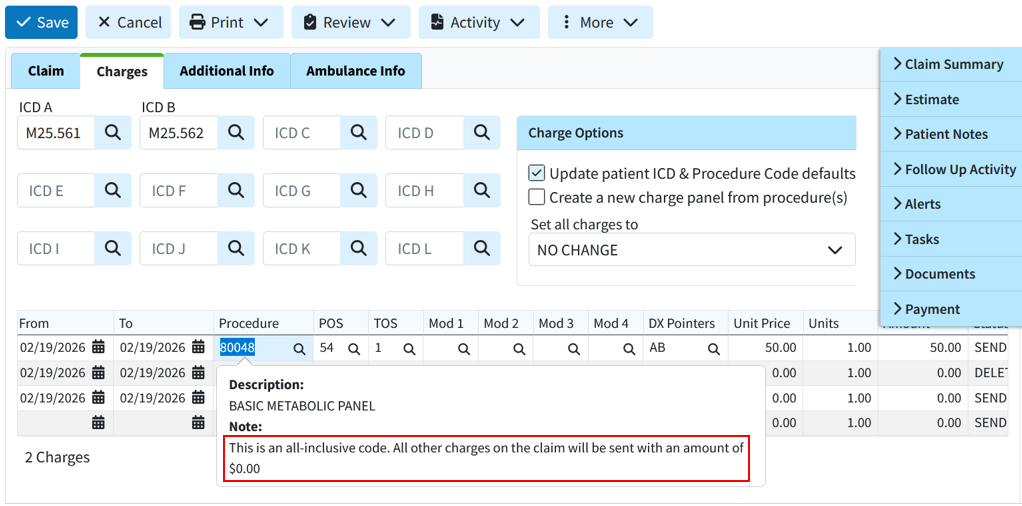
TCN Search Now Ignores the TCN Prefix
We recently added the submitter-level TCN Prefix feature to help the clearinghouse ensure that ERAs are routed correctly and to facilitate ERA splits.
This feature has been very helpful, but it could be inconvenient for some users depending on their workflow because if the full TCN, including the prefix, was copied from a payer report or EOB, users could not search for the correct claim or patient within the application. They would have to carefully copy the number while omitting the prefix, which could be difficult due to the small font on some reports.
In this release, the submitter-level TCN Prefix was updated so the system ignores it when searching by TCN in the claim, claim tracker, patient, insurance check, and ERA searches. This means that copying a TCN number from an EOB will no longer require partial selection for the search to function. This update allows the system to locate claims that include the prefix when copied.
Resolutions
WebAPI: Payer & Patient Default Value Codes Not Set on Claims
We have systematically implemented the ability to use more default codes from interface claims (such as value codes from revenue codes), but patient default codes and payer default value codes were still missing.
In this release, we are adding both Patient and Payer default value codes. When a claim is received via the API, the system will now add the default value codes in the following priority order:
1. Value Codes from the interface message (if sent)
2. Payer Defaults
3. Patient Defaults
4. Revenue Code Defaults
At each priority step, the system will only add value codes that have not already been included. For example, if the interface message sends value code 16, and the patient defaults include value code 16 and value code 18, then the message's amount for value code 16 will be used, followed by the patient's amount for value code 18.
Practice email address is automatically set as the "Reply-To" address for electronic statements
Previously, the practice email address was automatically set as the Reply-To address for electronic statements. Users were often unaware that the practice email was used as the default Reply-To email address when setting up their electronic statements, as this option is part of the electronic statement options. To prevent user error, we updated this release to default the Reply-To address to "No Reply," even when a practice email address is available. This will ensure that any Reply-To address set for electronic statements is added intentionally by the customer. Please note that existing configurations will not change. This applies only to electronic statement setups moving forward.
ERA: Incorrect Claim Status
Resolved an ERA issue that caused a charge balance with no additional payers to display an incorrect claim status. It showed a "PAID" status instead of "BALANCE DUE PATIENT," despite an existing balance and no other payers.
ERA & EOB: Incorrect allowed amount on refund/reversal
We corrected an issue within our ERA/EOBs causing an incorrect auto-calculation of the allowed amount on some refund/reversals.
Universal Import: Support First and Last Names with Spaces
We corrected an issue within our universal import detected during testing where names containing spaces but no hyphens, apostrophes, or symbols (e.g., "De La Cruz," "Van Dyke," "Mary Jane") were not recognized correctly during import.
As part of this release, we are continuing our ongoing work to assess, monitor, and address any security vulnerabilities.
Highlights
| New Features | Enhancements |
|---|---|
| Universal Import - BETA
|
New Option to Ignore Modifiers Received From The WebAPI
|
New features
Universal Import - BETA
These new import options are currently in BETA testing and will be available to all customers soon!
Our Universal Interface Import allows users with an EMR/EHR that has not built an interface with us to import encounter, claim, and patient data from any external system. Customers can now upload CSV, Excel, TSV, and pipe-delimited files using our Interface Import section. This new feature uses AI-powered field mapping to automatically interpret the structure of CSV/Excel files from other systems and map them into CMD. This feature allows customers who do not use our WebAPI to automatically import claims, and patients from any EMR/EHR via a report or export from their software.
Customers can also manually import claims into our system in the HL7 format or claims from an 837 ANSI file format into CollaborateMD.
For more information visit our Universal Import Help Article.
Enhancements
New Option to Ignore Modifiers Received From The WebAPI
When configuring interfaces, we can currently set up the interface to ignore the price that comes over in the message and use our own pricing instead. This is necessary because CMD, as the billing system, houses the fee schedules and contracts. We also have many defaults & automations around modifiers (specifically situational modifiers), but those rules are not used if modifiers are received from your EMR. Some users do not want this since if the modifiers entered in the EMR are wrong, automations will not work.
In this release, we added new options to the Interface Settings screen (for WebAPI Interfaces) that allows you to ignore modifiers sent via the interface. The new setting "Set modifiers based on the modifiers received from the Interface?" will default to Yes to allow setting the modifiers based on the modifiers received from the interface (just like it does today). Even if this is set to Yes, default and situational modifiers will be used if they are not received from the Interface. When set to No it will ignore the modifiers sent from the interface.

For more information visit our Configure Interface Settings Help Article.
New Option To Get Current Claim Status Through The WebAPI
We previously introduced an API endpoint request that allows users to set the claim status. To allow API vendors to continue building on this capability, we added the ability to retrieve the current claim status. This will return an XML response that includes the Claim Status ID, Claim Location ID, and Claim Status Display value.
Resolutions
Report Performance Issue When Combining Results
We resolved an issue in our Report Viewer where reports, run for multiple customers with the "combine results" option selected, took longer to process compared to running the same report with separate results.
Mark as Fixed Issue in Claim Tracker
Corrected an issue within claim tracker where, when checking the Mark As Fixed checkbox on Intelligent Claim Rejection messages should also mark all of the hidden issues as fixed but instead was flagging issues as "Not Fixed."
As part of this release, we are continuing our ongoing work to assess, monitor, and address any security vulnerabilities.
Highlights
| New Features | |
|---|---|
| New Interface Automations |
New features
New Interface Automations
Our CollaborateMD interface provides a powerful bridge to automatically create patients, appointments, and claims in the CMD application via interface messages (ADT, SIU, DFT). Previously, after a patient appointment or claim was received & created via the interface, users still had to perform manual work such as checking eligibility, reviewing/scrubbing claims, or address verification. Powerful add-on features like Eligibility, Claim Scrubbing, and Address Verification had to be used either through a separate integration with our WebAPI (for Eligibility only) or manually in the application. In this release, these actions can now be automated to occur as soon as the claim, patient, or appointment is received. For more information visit our Manage Interface Automations Help Article.
We added the following new automations that can be enabled and configured within the services section by Auth Reps:
Eligibility Interface Automation
We created 2 new eligibility settings to allow eligibility to be automatically checked when a patient, appointment, or claim is created via the interface:
Automatically check eligibility when an appointment or claim is created over an Interface?
Select Yes if you want an automatic eligibility check when creating an appointment or claim, from an SIU or DFT message received via the interface.
Automatically check eligibility when a patient is created or updated over an Interface?
Select Yes if you want an automatic eligibility check when creating a patient from an ADT message received via the interface.

Claim Scrubbing Interface Automation
We created a new claim scrubbing setting to automatically review claims created via the interface:
Automatically review and scrub new claims as they are entered through an Interface?
Select Yes if you want to automatically scrub new claims created from a DFT message received via the interface.

For more information visit our Manage Claim Scrubbing Help Article.
Address Verification Interface Automation
We created a new Address Verification setting to automatically scrub addresses when creating/editing a patient record via the interface:
Automatically scrub addresses when the above changes are made via Interface?
Select Yes if you want to automatically scrub addresses (based on your pre-selected options) when creating or editing a patient record from an ADT/DFT message received via the interface.

For more information visit our Manage Address Verification Help Article.
Coming Soon - Patient Estimates Interface Automation
The ability to automatically generate patient estimates upon appointment or claim creation via the interface will be added soon!
Resolutions
Claim Control for Large Batches
We resolved an issue within Claim Control that could prevent users from changing the status of more than one thousand claims at once. This action would cause a "Maximum call stack size exceeded" console error when updating the claim status. With this new update, when a user updates claim statuses, it is performed in batches of 1,000 and pre-selects all the remaining claims that exceed 1000 after in initial claim status update. If more than 1,000 claims are selected for saving, a modal will appear stating: "Only 1,000 claims can be saved at once. After the save is complete, the remaining X claims will be selected in the table and can then be saved." Following the save, the selections in the table will be updated accordingly.
Intelligent Claim Rejections Enabled by Default
The Intelligent Claim Rejection feature was enabled for most customers, but an issue prevented its automatic enablement for new submitters. This issue marked the submitter in CMD with the feature turned on without changing the submitter request sent to ePS. In this release, we corrected this issue to ensure that submitter registrations sent to ePS turns this feature flag on.
Intelligent Claim Rejections Enabled by Default
In this release, we corrected some appointment reminder issues where some appointments were not sent and others had expired confirmation tokens. This issue was causing the confirm & cancel links in the appointment reminder to stop working after an additional reminder was sent to the patient.
As part of this release, we are continuing our ongoing work to assess, monitor, and address any security vulnerabilities.
Highlights
Enhancements
New "To Date" Optional Column
We have always displayed the "From" Date (Date of Service) as a column in our Claim Control, Claim Tracking, and Follow-Up Management tables. This represents the first date of service on the claim. Customers who treat patients for extended periods (especially those using Institutional claims) could not view the complete range of service dates in these tables. In this release, we added the "To" Date (representing the last date of service on the claim) as an optional, hidden-by-default column. 
New ERA Warning when Patient Name Doesn't Match
A new ERA Warning has been implemented for instances where the patient's first or last name on the ERA (EraClaim.plast and EraClaim.pfirst) does not match the name recorded in our application. The warning message, "Warning: The patient name as sent by the payer does not match your records," will alert users to this discrepancy.
As part of this release, we are continuing our ongoing work to assess, monitor, and address any security vulnerabilities.
Highlights
| Enhancements | |
|---|---|
| New Referring Provider Note Report Field New Optional Columns in Claim Control & Follow Up Management ERA Claim-level Payments Now Evenly Applied |
Enhancements
New Referring Provider Note Report Field
In this release, we added a new report field for the Referring Provider’s Note text field. This new report field (available under Referring Data) is useful for recording various information. For example, users can note the name of the facility a referring provider is from, allowing them to report on the number of lab samples received from each facility. 
New Optional Columns in Claim Control & Follow Up Management
Some customers use the Account Type and Reference # fields in CMD to store information that does not fit elsewhere in the application. While integrating fields for workflows across different specialties would be ideal, many customer issues can be resolved by allowing them to view this information in various places. In this release, we added these two columns as optional (not visible by default) in both Follow Up Management and Claim Control. 
ERA Claim-level Payments are Now Evenly Applied
Some payers (particularly for institutional claims) send only a claim-level payment rather than line-item payments. Previously, our system applied these payments by distributing as much of the paid amount on each charge as possible, and then as much of the adjusted amount on each charge as possible, resulting in uneven claim application, and requiring users to manually correct the ERAs for institutional claims. With this release, these payments will now be applied evenly.
As part of this release, we are continuing our ongoing work to assess, monitor, and address any security vulnerabilities.
Highlights
New features
Updated E-statement Experience: Cleaner, Easier-to-Read E-Statement in the Payment Portal
In this release, we’ve redesigned our e-statement in the Payment Portal so patients can read and pay their statement more easily, especially on a phone. The new updates are:
- More room for the statement: We updated the header, footer, and sidebar so less of the screen goes to names, addresses, and blank space. Almost the whole screen on mobile can now be used for the statement itself.
- A simpler charges table: The table used to have four columns, and long descriptions ran onto several lines. On mobile it now has two columns: each charge, followed by a line for each payment. On desktop, the table still has separate columns, so patients can see the amount and balance side by side.
We want patients to understand their statement at a glance. This release allows patients to get a more readable statement on any device, with less scrolling and less confusion over the table. A cleaner layout and an easier-to-scan table make it faster to see what they owe and why, which helps them pay with confidence.

New: Smarter Provider Adjustments
A provider adjustment is a payment that isn’t tied to a specific claim. For example, a payer may have overpaid you $250 earlier and now pays $250 less on a later check, without an EOB that explains it. Despite the name, provider adjustments are payments. They adjust the amount of the check. These Provider adjustments have are usually hard to manage because they have no clear reason attached.
With this release, provider adjustments now show up in your reports next to the right provider, practice, office, or facility. You’ll no longer see them grouped on a “No Provider” line. This makes it easier to reconcile checks and to see revenue by provider or location so your reports can attribute it correctly.
CMD will work out where an adjustment belongs in the following order:
- Linked to a claim: If the adjustment is linked to a claim, it uses that claim’s provider, practice, office location, and facility.
- Matched by NPI: If it isn’t linked to a claim, CMD tries to match the NPI on the adjustment to one of your providers, practices, or office locations, and fills in the related details. If the NPI matches an office location, the adjustment also gets that office’s practice. If the match doesn’t identify an office, CMD uses the practice’s first office location. If it doesn’t identify a provider, CMD uses the provider from the first claim for that practice and office.
- No NPI match: If the NPI doesn’t match anything, CMD uses the practice, provider, facility, and office from the first claim on the check.
Please note that this applies to Provider Adjustments posted on or after Monday, October 19, 2026.
New Payer Option: Round Anesthesia Units Up to the Next Whole Unit
Anesthesia time is usually converted to units at 15 minutes per unit. For example,15 minutes is 1 unit, and 20 minutes is 1.333 units. But some payers, such as workers’ comp and other plans that don’t follow Medicare rules, don’t accept partial units and want them rounded up.
In this release, we’ve added a new option to a payer’s billing options that rounds anesthesia time up to the next whole unit. This option lets you meet that requirement without editing each claim by hand. When the option to "Round anesthesia units up to whole units" is checked for a payer, anesthesia units will be rounded up to the next whole unit. The rounding happens when the claim is entered, including anesthesia minutes that arrive through an interface, claims imported with Universal Import, and claims typed in manually. 
Please note:
- The rounding does not happen at the time of billing. The units on the claim are what goes out to the payer.
- The option doesn’t affect secondary claims, so the primary and secondary claims won’t carry different units.
- Claims entered before you turn the option on are not affected/changed.
For more information, please visit our General Billing Options Help Article.
Enhancements
New Field: Account Type Now Shown in the Account & Claim Summary
Account types can sometimes affect how you bill and work with a patient. Some practices use custom account types to decide how payments are posted or how claims are billed. Showing the account type in the account summary puts that information in front of staff while they work, so they don’t have to look it up.
With this release, the account summary side panel now includes an Account Type field. You’ll see it in the Patient section, the Claim section, and anywhere else the account summary appears. If you use account types to guide your workflow, you can now see them wherever you’re working on a patient or a claim, without opening a separate screen. 
For more information, please visit our Account Summary Help Article.
Update: New "Admin Users" Can Now Add Practices by Default
During onboarding, an auth rep or owner often hands setup over to an admin. Because new admins couldn’t create a practice, the person who wanted to hand off the work had to step back in and do that part themselves. With this release, when you create a new admin user, they now get Access, Modify, and Create permissions for Practices by default. Before, new admins only had Access and Modify, so they couldn’t add a new practice. This means that Admin users you create from now on can add practices without any extra permission changes.
Please note that this does not change existing users. No one’s current permissions are affected, including admins who already exist. If you want an existing admin to be able to add practices, you can still give them "Create" access for the Practice permission manually.

Visit our Practices Help Article for more information.
Improvement: Daily Updates for the First Pass Resolution Rate Gadget Are Coming Back
For the last several months, the First Pass Resolution Rate gadget on the welcome screen has only updated weekly because of performance issues. A weekly refresh means you could be looking at data that’s several days old. This release adds the ability for the gadget to receive daily updates. Daily updates give you a more current view of how many claims are resolved on the first pass. 
Improvement: Custom Payment Reports Can Now Include Insurance Check Data
Some practices need check-level details next to their payment details, such as which checks are committed and which still have money left to apply. Before, that information couldn’t be combined with payment data in a custom report.
With this release, custom payment reports can now include insurance check data alongside individual payment information. For example, a custom Daily Deposit report can show whether each check has been committed, or whether an insurance check has an unapplied amount. Insurance check data is also now linked to credit data in custom reports. This means payments can be reported by provider, practice, payer, and office.
Please note that Insurance Check Data fields can only be added to your report by CollaborateMD.
New WebAPI Capabilities: Deposit Date on Payments and Claim Statuses by Name
This release adds two improvements to the WebAPI for integration partners.
1. Deposit Date Now Supported on Payments
The WebAPI payment capability now accepts a deposit date in addition to the date the payment was received. For example, an integration can send the date a credit card payment settled as its deposit date. Many practices do their reporting by deposit date. The CMD application already tracks both dates, and the WebAPI now matches it, so payments that arrive through an integration can be reported the same way.
2. Claim Statuses Can Now Be Sent by Name
When an integration updates a claim’s status, it can now send the name of the status as well as its identifier. Practices with hundreds of custom claim statuses previously had to look up the identifier for each one. Sending the name removes the need for that lookup.
We also added a new optional column (hidden by default) to the Custom Claim Status table for the status identifier for customers who use these identifiers and want a visual representation. 
Resolutions
Resolved Issue: ERA Interest Payments Not Linking to the Correct Claims
When an ERA included interest paid through a provider adjustment, CMD didn’t always link the interest to the right claims. There were two problems:
- Interest didn’t match its claim. The interest amount on the claim and the provider adjustment have opposite signs, so CMD often failed to match them and the interest wasn’t linked to the correct claim.
- Interest was spread by balance, not by actual interest. When one interest adjustment covered the interest for many claims, CMD linked it to all of them and then, in most cases, applied the full amount to a single claim.
This issue has now been fixed and CMD now matches interest adjustments to claims correctly. It also uses each claim’s actual interest amount to decide how much to apply to that claim, so each claim gets only its own interest. This makes it easier to reconcile interest against the ERA and to report on interest by claim.
Resolved Issue: Multiple Universal Import Resolutions
Corrected an issue where, in rare cases, saving a new claim co
Universal Import Removing Dashes and Other Characters from Procedure Codes
Universal Import removed dashes from procedure codes before matching them. A code like 99213-TELE was read as 99213TELE. Many practices add a dash-separated suffix to a code for reporting. That suffix isn’t billed, but the code is its own entry in the practice’s code library. Because the dash was removed, Universal Import couldn’t match these codes to the ones in the library. Depending on the import, this could create a new, incorrect code or leave the charge uncreated.
This issue has been fixed. Universal Import now keeps dashes and other special characters in procedure codes, in line with what you can enter in the application. Codes with suffixes are matched to the correct code in your library.
Universal Import Setting a Blank Admission Hour to 12:00 AM
When you imported a claim with Universal Import and the Admission Hour column was blank or missing, CMD set the claim’s admission hour to 12:00 AM - 1:00 AM instead of leaving it empty. The claim then showed an admission time that wasn’t in your file.
This issue has now been corrected. If your import file has no Admission Hour, the claim’s Admission Hour stays blank.
Universal Import Not Reading the Procedure Code Column?
In some cases, Universal Import didn’t read the procedure codes from your file, even though the file had a Procedure Code column. The import preview showed the column matched correctly and listed no errors. When you completed the import, it warned about a missing or invalid CPT code and didn’t create the claim, because it found no valid charges.
This issue has been fixed. Universal Import now reads the procedure codes from the Procedure Code column, and claims are created with their charges.Improvement: WebAPI Supervising Providers With a Space in the Name Are Now Matched
Previously, CMD matched supervising providers sent via the WebAPI as “Last, First” when no identifier or sequence number was included. If either name had a space, CMD couldn’t match the provider, and Interface Tracker showed a warning that the supervising provider could not be matched.
With this release, when an integration sends a supervising provider in the XML and puts both names in the LastName field, such as “Last, First”, CMD can match the provider even if one of the names contains a space. Names like “John, Van Gogh” or “De LaGrange, Mike” now match.
Resolved Issue: Time Sent on Institutional Claims for Non-Inpatient Bill Types
For institutional claims with outpatient bill types such as 32x, CMD sent the admission time to the clearinghouse along with the admission date. Under UB-04 rules, only the admission date should be sent on these claims. Admission time applies to inpatient claims.
This issue has been fixed. For non-inpatient bill types, CMD now sends only the admission date. Admission time is sent only on inpatient claims.