Highlights
| New Features | Enhancements |
|---|---|
| Universal Import - BETA
|
New Option to Stop Showing the All-Inclusive Code Warning
|
New features
Universal Import Updated UI - BETA
Please be aware that the new universal import options are currently in BETA testing and will be available to all customers soon!
In this release, we updated the Universal Import user interface to simplify the process and improve readability. We enhanced it by removing unnecessary fields and clutter, renaming file naming conventions, automating the matching of existing templates, and converting mapped preview data into a table. This facilitates scanning either the header or CMD field to ensure accurate field matching.

For more information visit our Universal Import Help Article.
Enhancements
Claim: New Option to Stop Showing the All-Inclusive Code Warning
All-inclusive codes are common in Rural Health Clinics and Federally-Qualified Health Centers. In our system, entering a claim with an all-inclusive code triggers a warning. This notification indicates that an all-inclusive code has been selected and explains the impact on other charges. These charges will either not be billed or will be billed with a nominal amount, such as $0.00 or $0.01, depending on system configuration.
Because this all-inclusive code prevents users from editing other charges on the claim, the pop-up informs them that these are non-editable amounts. The problem is that this is inconvenient for some customers that work thousands of claims, when it happens for every claim.
To address this, a "Don't show this again" checkbox has been added to the All-Inclusive Code warning message in this release. Checking this box allows users to suppress the All-Inclusive Code warning dialog for the same user when editing or creating a new claim with an inclusive code.
 We also added a tooltip under the procedure description so that the information is still available without disrupting or prompting the user to close the warning.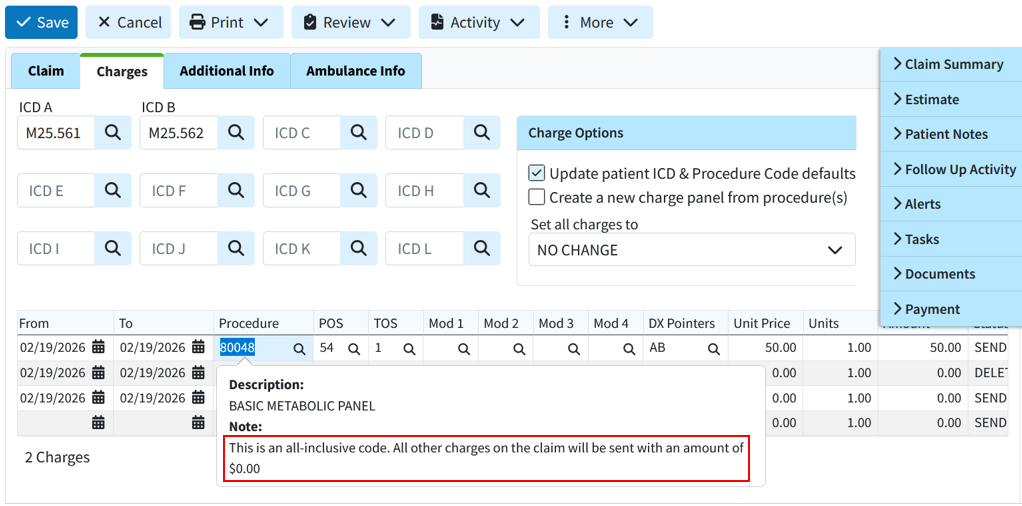
TCN Search Now Ignores the TCN Prefix
We recently added the submitter-level TCN Prefix feature to help the clearinghouse ensure that ERAs are routed correctly and to facilitate ERA splits.
This feature has been very helpful, but it could be inconvenient for some users depending on their workflow because if the full TCN, including the prefix, was copied from a payer report or EOB, users could not search for the correct claim or patient within the application. They would have to carefully copy the number while omitting the prefix, which could be difficult due to the small font on some reports.
In this release, the submitter-level TCN Prefix was updated so the system ignores it when searching by TCN in the claim, claim tracker, patient, insurance check, and ERA searches. This means that copying a TCN number from an EOB will no longer require partial selection for the search to function. This update allows the system to locate claims that include the prefix when copied.
Resolutions
WebAPI: Payer & Patient Default Value Codes Not Set on Claims
We have systematically implemented the ability to use more default codes from interface claims (such as value codes from revenue codes), but patient default codes and payer default value codes were still missing.
In this release, we are adding both Patient and Payer default value codes. When a claim is received via the API, the system will now add the default value codes in the following priority order:
1. Value Codes from the interface message (if sent)
2. Payer Defaults
3. Patient Defaults
4. Revenue Code Defaults
At each priority step, the system will only add value codes that have not already been included. For example, if the interface message sends value code 16, and the patient defaults include value code 16 and value code 18, then the message's amount for value code 16 will be used, followed by the patient's amount for value code 18.
Practice email address is automatically set as the "Reply-To" address for electronic statements
Previously, the practice email address was automatically set as the Reply-To address for electronic statements. Users were often unaware that the practice email was used as the default Reply-To email address when setting up their electronic statements, as this option is part of the electronic statement options. To prevent user error, we updated this release to default the Reply-To address to "No Reply," even when a practice email address is available. This will ensure that any Reply-To address set for electronic statements is added intentionally by the customer. Please note that existing configurations will not change. This applies only to electronic statement setups moving forward.
ERA: Incorrect Claim Status
Resolved an ERA issue that caused a charge balance with no additional payers to display an incorrect claim status. It showed a "PAID" status instead of "BALANCE DUE PATIENT," despite an existing balance and no other payers.
ERA & EOB: Incorrect allowed amount on refund/reversal
We corrected an issue within our ERA/EOBs causing an incorrect auto-calculation of the allowed amount on some refund/reversals.
Universal Import: Support First and Last Names with Spaces
We corrected an issue within our universal import detected during testing where names containing spaces but no hyphens, apostrophes, or symbols (e.g., "De La Cruz," "Van Dyke," "Mary Jane") were not recognized correctly during import.
As part of this release, we are continuing our ongoing work to assess, monitor, and address any security vulnerabilities.