Highlights
| New Features | Enhancements |
|---|---|
| Universal Import - BETA
|
New Option to Ignore Modifiers Received From The WebAPI
|
New features
Universal Import - BETA
These new import options are currently in BETA testing and will be available to all customers soon!
Our Universal Interface Import allows users with an EMR/EHR that has not built an interface with us to import encounter, claim, and patient data from any external system. Customers can now upload CSV, Excel, TSV, and pipe-delimited files using our Interface Import section. This new feature uses AI-powered field mapping to automatically interpret the structure of CSV/Excel files from other systems and map them into CMD. This feature allows customers who do not use our WebAPI to automatically import claims, and patients from any EMR/EHR via a report or export from their software. 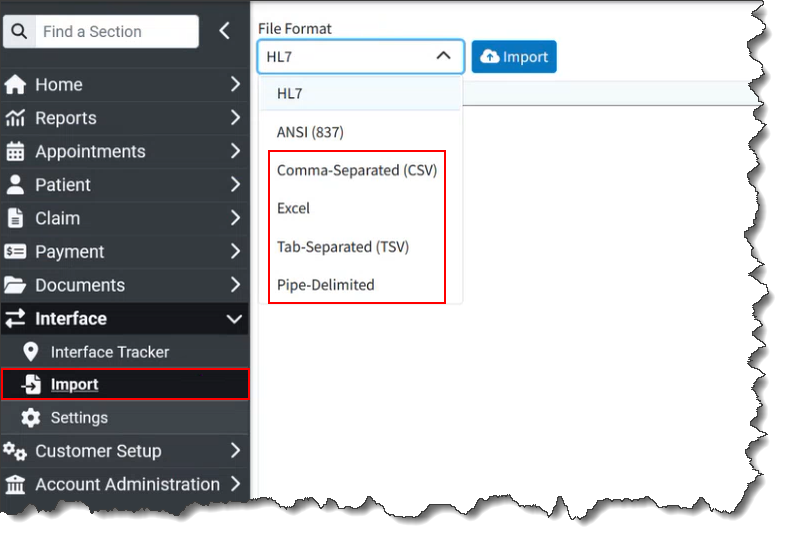
Customers can also manually import claims into our system in the HL7 format or claims from an 837 ANSI file format into CollaborateMD.
For more information visit our Universal Import Help Article.
Enhancements
New Option to Ignore Modifiers Received From The WebAPI
When configuring interfaces, we can currently set up the interface to ignore the price that comes over in the message and use our own pricing instead. This is necessary because CMD, as the billing system, houses the fee schedules and contracts. We also have many defaults & automations around modifiers (specifically situational modifiers), but those rules are not used if modifiers are received from your EMR. Some users do not want this since if the modifiers entered in the EMR are wrong, automations will not work.
In this release, we added new options to the Interface Settings screen (for WebAPI Interfaces) that allows you to ignore modifiers sent via the interface. The new setting "Set modifiers based on the modifiers received from the Interface?" will default to Yes to allow setting the modifiers based on the modifiers received from the interface (just like it does today). Even if this is set to Yes, default and situational modifiers will be used if they are not received from the Interface. When set to No it will ignore the modifiers sent from the interface.

For more information visit our Configure Interface Settings Help Article.
New Option To Get Current Claim Status Through The WebAPI
We previously introduced an API endpoint request that allows users to set the claim status. To allow API vendors to continue building on this capability, we added the ability to retrieve the current claim status. This will return an XML response that includes the Claim Status ID, Claim Location ID, and Claim Status Display value.
Resolutions
Report Performance Issue When Combining Results
We resolved an issue in our Report Viewer where reports, run for multiple customers with the "combine results" option selected, took longer to process compared to running the same report with separate results.
Mark as Fixed Issue in Claim Tracker
Corrected an issue within claim tracker where, when checking the Mark As Fixed checkbox on Intelligent Claim Rejection messages should also mark all of the hidden issues as fixed but instead was flagging issues as "Not Fixed."
As part of this release, we are continuing our ongoing work to assess, monitor, and address any security vulnerabilities.