Resolutions
Claim Scrubbing: Copy Configuration Issue Corrected
We previously introduced an option within the Claim Scrubbing configuration screen that allows customers to set up or change their specialty to receive more tailored edits for their specific claims. Billing services, in particular, need to be able to use the Copy Configuration option to easily set up all of their customers' claim scrubbing configurations. However, when Copy Configuration was recently used, it was not copying correctly, and we were not setting up Aptarro submitters for any of the customers that had it enabled. In this release, we updated the claim scrubbing configuration window. When a specific specialty is selected, and then the "Copy Configuration" button is clicked, the system will display the selected specialty for each customer in the list. (The normal logic will be used to select a default specialty if one has not been chosen.) Additionally, when a configuration is copied, the system will register all necessary submitters with Aptarro. 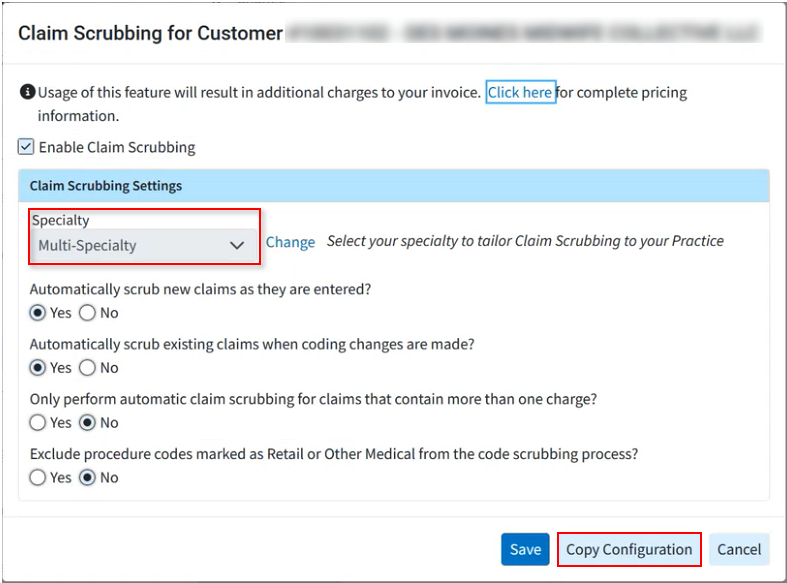
Interface Tracker: Not all Columns Visible at Minimum Resolution
We corrected an issue within Interface Tracker causing some columns not to be visible when the monitor was at minimum resolution. With this update, users can now horizontally scroll to see all columns on all supported browsers/screen resolutions.
As part of this release, we are continuing our ongoing work to assess, monitor, and address any security vulnerabilities.